











KOLOGY Software Pro · Pantallas y funciones
Delivery completion and proof
Track the batch, record completions in the office, view completions and photos sent by drivers, and export the report.
Este artículo aún no está traducido a su idioma: se muestra la versión en English.
En esta página
In Pro, a delivery can be completed in two ways: by the driver in the portal (with recipient and photo), or by the office on the Delivery completion screen. Either way, the map updates and the completed delivery turns green.
Where it is
Top menu Delivery completion, or on the map Operations → Delivery completion. For administrators and operators.
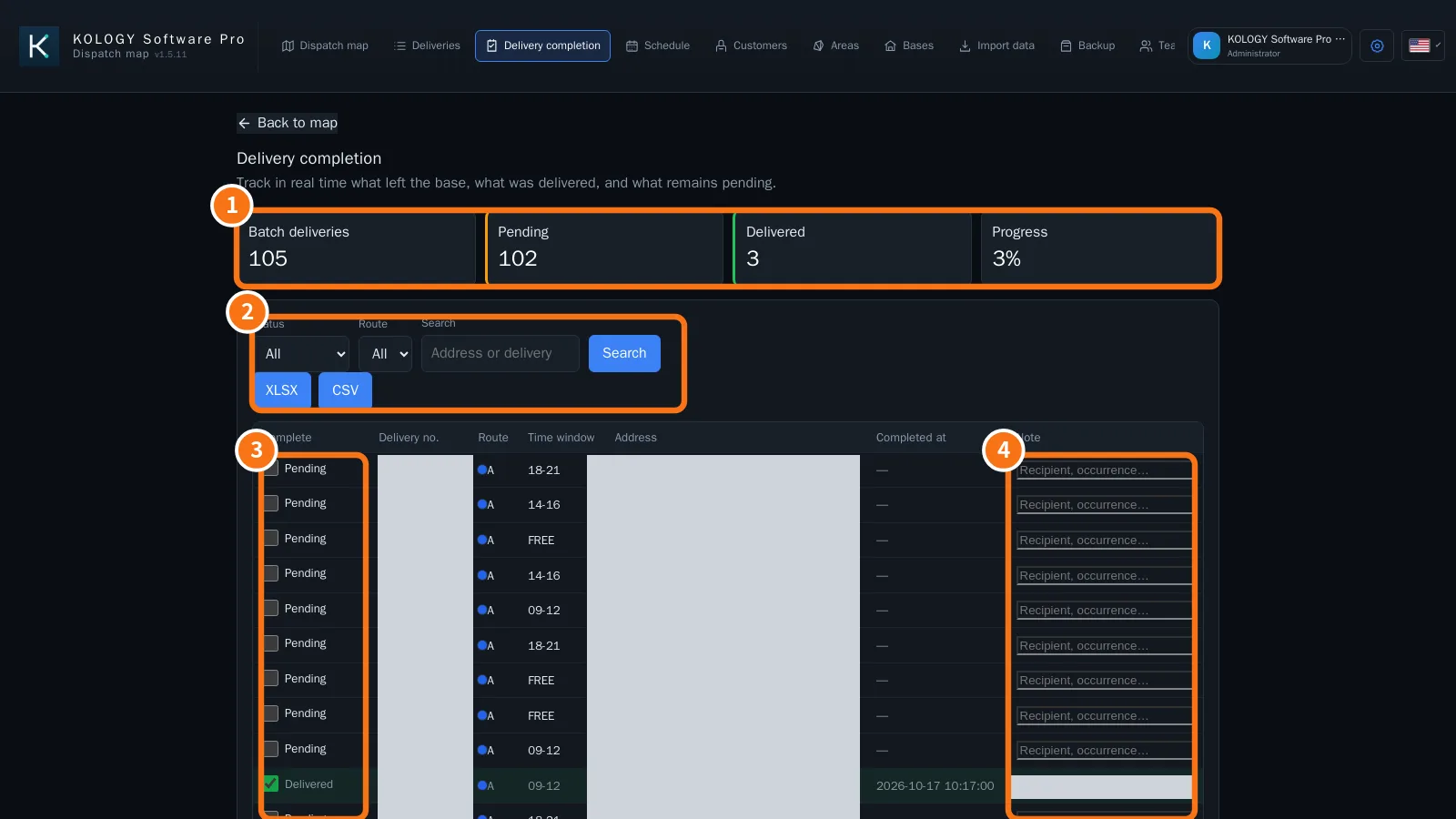
What is on the screen
- Batch deliveries, Pending, Delivered and Progress.
- Status, Route and Search filters, and the XLSX and CSV buttons.
- Complete column: tick to complete; the time goes to Completed at.
- Note column: occurrence, recipient, return.
Step by step: completion from the office
- Filter the route or search the slip.
- Tick Complete and, if needed, write the Note.
- It saves at once. On the map, the pin turns green.
View the proof sent by the driver
- On the map, click the completed delivery. The Selected tab shows the photo thumbnail, time, recipient and note.
- Click View proof. The image opens in a large viewer over the map, with the completion details.
- Close it with the button, by clicking outside or with Esc. The delivery stays selected.
Daily report
Filter Status = Pending to see what is left. To file the day, go back to All and click XLSX or CSV.
Common mistakes
- The driver's completion did not appear: check the Sync indicator. If it says “offline”, it arrives when the connection returns.
- Ticked by mistake: untick it; the delivery goes back to Pending.
Who records what
- Where · What is recorded
- Driver portal · Delivered, recipient, note and photo (proof).
- Delivery completion screen · Delivered, completion time and note.
Both paths update the same delivery record and are synchronized.
Related questions
- Driver portal
- How to record a delivery (driver)
- Driver record