











KOCHAT · Primeros pasos
Create a free personal account
For drivers, partners and outside people who talk with KOMORI: sign up at chat.its-komori.com/free, confirm with an emailed code and join your groups automatically.
Este artículo aún no está traducido a su idioma: se muestra la versión en English.
En esta página
What it is for
The free personal account is for people who talk with KOMORI but have no company account: drivers, partners, suppliers and other outside people. With it you chat in the groups you belong to, send photos, files and voice messages, and talk one-to-one (including calls) with people in the same group.
Where it is
In a browser, at chat.its-komori.com/free (works on phones and computers). The Android app also has No account? Create one on the sign-in screen. On iPhone, sign-up is only through the website.
Step by step
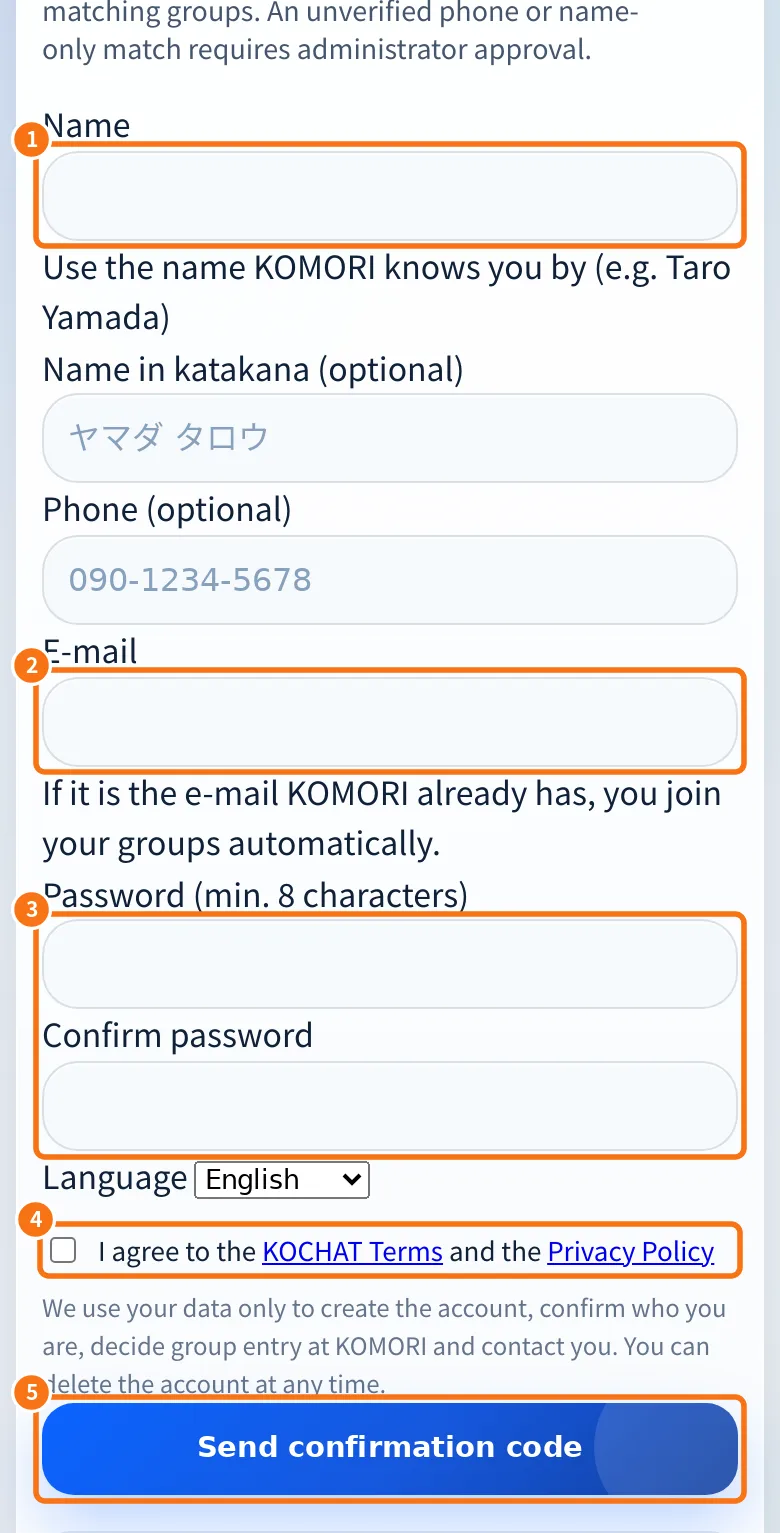
- Open chat.its-komori.com/free. At the top, choose the page language (PT, JP, EN and others).
- ① In Name, use the name KOMORI knows you by. Name in katakana and Phone are optional, but they help find your groups.
- ② In E-mail, use the email KOMORI already has for you, if any. That way you join your groups automatically.
- ③ Create a Password (at least 8 characters) and repeat it in Confirm password. Choose the Language.
- ④ Read and tick I agree to the KOCHAT Terms and the Privacy Policy.
- ⑤ Tap Send confirmation code.
- Open the email you received. Enter the 6-digit code and finish the sign-up, or tap the confirmation button in the email. The code is valid for 24 hours.
- The Account created screen shows how many groups you joined. Now download the app and sign in with the same email and password.
How you join groups
- Same email as KOMORI already had, or as a group invitation: you join right away.
- Only phone, or a similar name: it becomes a request. The person in charge of the group confirms it and you get an email.
- No group found: give your email to the KOMORI person you talk with. They can invite you.
My account (in the browser)
After sign-up, the free account page shows Groups you are in, the ones Awaiting confirmation, how much file space you used, and the buttons to Leave a group, Delete account and Sign out.
Common mistakes
- “This email already has an account”: sign in through the app. Forgot your password? Use Forgot your password? on the sign-in screen.
- The code did not arrive: check your spam folder. After 24 hours, tap Start over.
- “Wrong code” / “Too many attempts”: type carefully; after many tries you must start over.
- I want to register my company: company sign-up for KOCHAT alone is closed. For companies, KOCHAT comes with KOREOS (contact KOMORI).
Related questions
- KOCHAT plans and limits
- Account types and roles in KOCHAT
- Sign in, sign out and reset your password
- Delete your account