











KOCHAT · Pantallas y funciones
Reply mode (with or without AI)
Choose whether you reply yourself, get suggestions from the company AI, or let the AI reply in a chat — as a default and per chat.
Este artículo aún no está traducido a su idioma: se muestra la versión en English.
En esta página
What it is for
Reply mode decides who writes the replies: you, you with suggestions from the company AI (KOIA), or, where allowed, the AI itself. It only exists for companies whose plan includes AI; elsewhere the mode is always My reply.
The modes
- Mode · What it does
- My reply · No AI: you write and send.
- Suggestions · KOIA suggests replies; you pick, edit and send.
- AI agent · KOIA replies on its own in that chat. Messages are marked as AI. Per chat only, and only where allowed.
Set the default
- Open Settings → General tab → Reply mode.
- Tap My reply or Suggestions. The default applies to every chat.
Change it in a chat
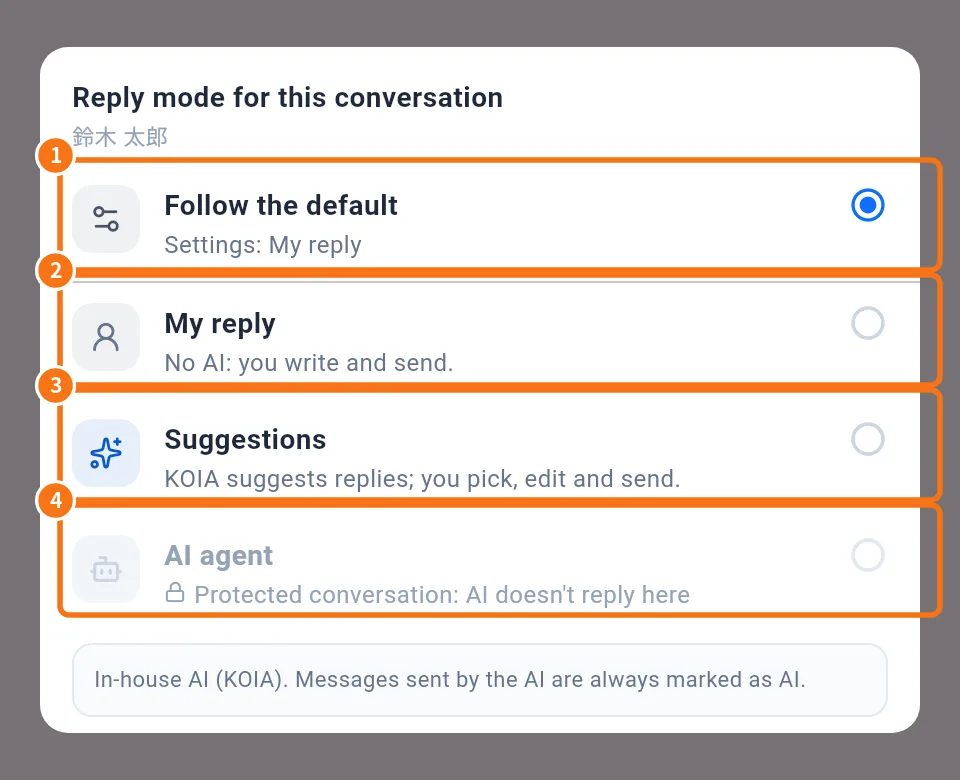
- In the chat, tap the mode button next to the message field (for example My reply ⌄). On computers a menu opens above the button; on phones, a sheet slides up.
- ① Follow the default: uses what is in Settings.
- ② My reply.
- ③ Suggestions.
- ④ AI agent: shown gray with a lock when not allowed, with the reason below.
Why an option is locked
- Your company's plan doesn't include AI.
- No permission in this conversation or Your role doesn't allow this mode.
- Not available in group chats or in external conversations.
- Protected conversation: AI doesn't reply here.
- This conversation is already with an AI assistant.
- Offline right now.
Common mistakes
- I chose a mode and it went back: the server refused it (a notice shows the reason). Check your internet and permissions.
- I do not see Reply mode: free personal accounts and plans without AI do not have this setting.
Related questions
- Settings: what each tab has
- KOCHAT plans and limits
- Account types and roles in KOCHAT
- FAQ: chats, attachments and translation