











KOCHAT · Pantallas y funciones
Groups tab and group chats
The Groups tab lists only group chats; how a group chat works: names on bubbles, @ mentions, who has read, settings and company groups.
Este artículo aún no está traducido a su idioma: se muestra la versión en English.
En esta página
What it is for
Groups bring several people into one chat: a team, a shift, a project. The Groups tab shows only the groups you belong to, so you find them quickly without mixing them with one-to-one chats. Groups also appear in the Chats tab.
Who uses it and where it is
Anyone in the company. Open KOCHAT and tap the Groups tab. Use Search group to filter by name. The blue number on the tab is the unread total for groups.
The group chat
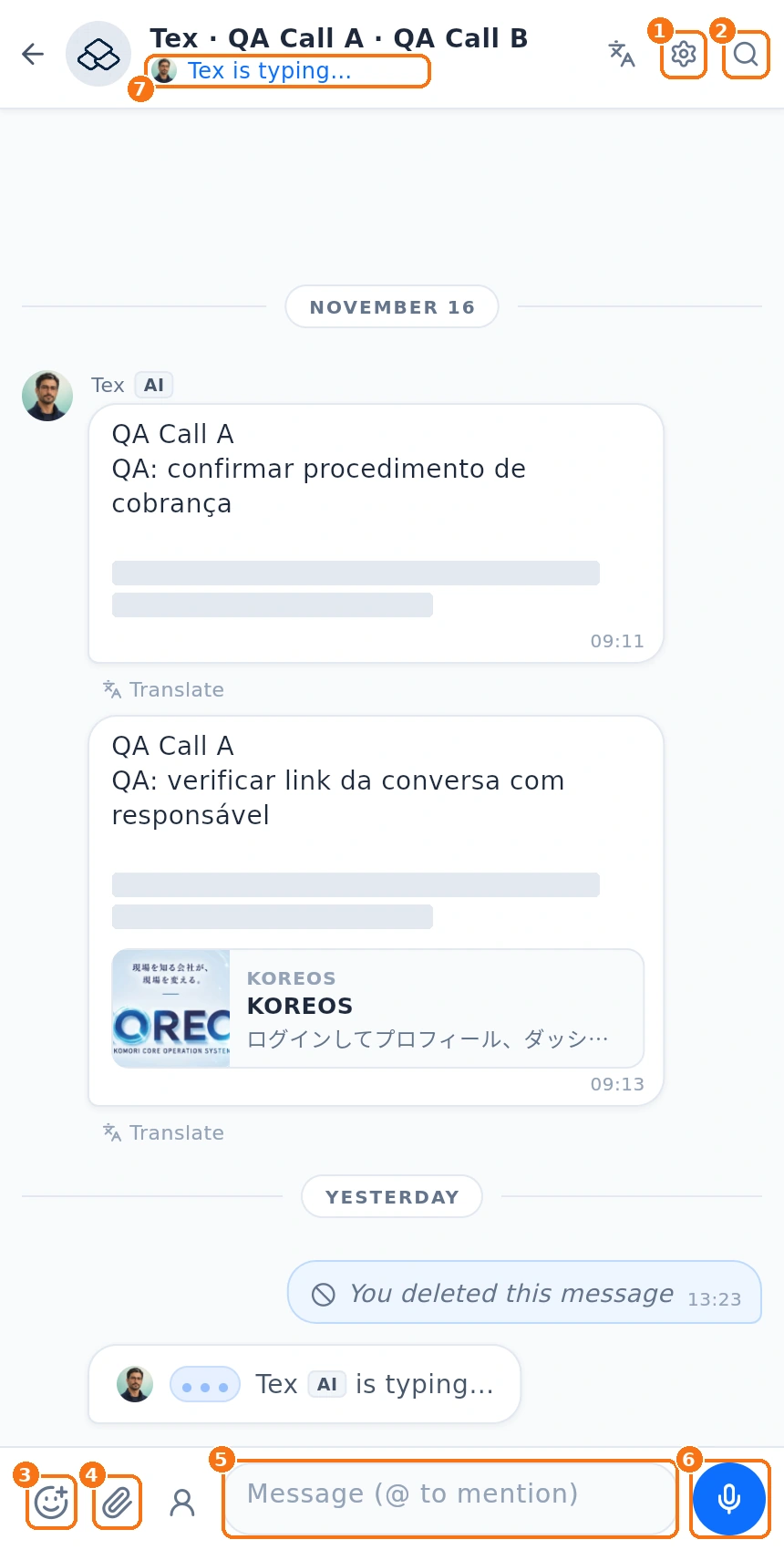
- Under the name you see Groups. Other people's messages show the writer's name and photo.
- ⑦ When someone is writing, the Typing… indicator at the top of the chat shows their photo and name.
- ① Gear: Manage group — name, photo, members and invite link.
- ② Magnifier: search inside the group.
- ⑤ Message (@ to mention) box: type @ to call someone; they get a notification. Names with a space (e.g. @斎藤 あゆみ) are highlighted in color and open the profile when tapped.
- To see who read, touch and hold your message → Message info: shows the X/Y read counter, who has read (with photo and time) and who hasn't yet.
- Groups have no voice/video call buttons; to call, open the one-to-one chat.
Step by step: start using a group
- In Groups, tap the group.
- Read the latest messages; the chat opens at the first unread one.
- Answer in the box below, or quote a message with Reply.
- If the group is very busy, mute it: touch and hold it in the list → Mute conversation.
Guests
People outside the company can join a group as a guest (through the invite link, when the plan allows). They see only that group and are marked "guest".
Common problems and what to do
- I left a group by mistake: ask a group admin to add you again.
- I can't rename it: only the owner and admins edit the group.
- The group is gone: you may have been removed, or the owner deleted it.
Related questions
- How to create a group and bring people in
- Manage a group: members, photo, invite link and leaving
- Writing: text, mentions, emoji, GIFs and stickers
- Chat info: media, files, links and search