











KoLite · Screens & features
Owner: subscribe, open and follow your system
A route for whoever subscribes to a KoLite system for a company or for themselves. From the catalog to the first access: choose the right model, fill in the sign-up, follow the status in the dashboard and enter the system. The site is in Japanese; button names appear with the translation in brackets.
On this page
What this is for
A route for whoever subscribes to a KoLite system for a company or for themselves. From the catalog to the first access: choose the right model, fill in the sign-up, follow the status in the dashboard and enter the system. The site is in Japanese; button names appear with the translation in brackets.
Step by step
- Open kolite.its-komori.com and choose システム (Systems); filter by your industry category or use search.
- Read each model’s name and description and, when available, open the preview; thumbnails are demonstrations.
- Read the model article under Systems by industry to know which screens it has before deciding.
- Click 契約する (Subscribe) and check the chosen system name in the summary.
- Fill in the sign-up: type (individual or company), person in charge, postcode with 住所を検索 (Find address), email and password; read the documents.
- Check the option: Start free (1 system, 1 user, no card) when offered, or paid monthly with tax and fee in the total; the standard paid plan allows up to 5 accounts per system.
- Confirm the email and enter the dashboard with ログイン (Sign in).
- On the system card, follow the status: 準備中 (Preparing) means wait; do not subscribe again.
- When 稼働中 (Live) appears, use 開く (Open) and check the system title.
- To sign in with Google, link the Google account in the dashboard using the same email.
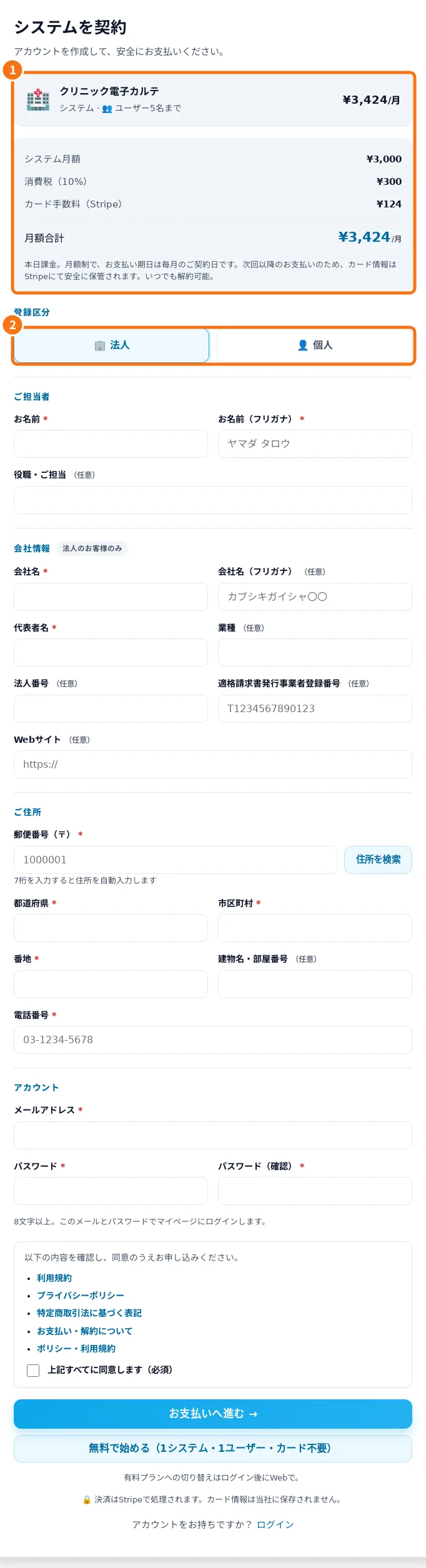
Demo screen. Numbered highlights mark the controls discussed; the image language may differ from yours.
Tip
If something goes wrong
Stuck in 準備中: reload later and check your email; do not subscribe again. Suspended status: read the reason before paying or subscribing again. Confirmation email not received: check spam and the registered address. Google sign-in fails: the Google account is not linked in the dashboard yet.
Related articles
- FAQ: 20 answers