











KoLite · Screens & features
Limits, billing, cancellation and help
KoLite provides ready-made systems under the displayed signup terms. Aya offers guidance, not transaction confirmation.
On this page
What this is for
KoLite provides ready-made systems under the displayed signup terms. Aya offers guidance, not transaction confirmation.
Step by step
- Read the service option: Free when offered or paid monthly.
- Check the standard paid allowance of up to 5 user accounts per system and data terms.
- Review the total including monthly fee, tax and fee before payment.
- Consult terms and support for cancellation; do not assume the dashboard has an unshown cancellation button.
- Use ヘルプ (Help) to ask Aya, stating the system and displayed status.
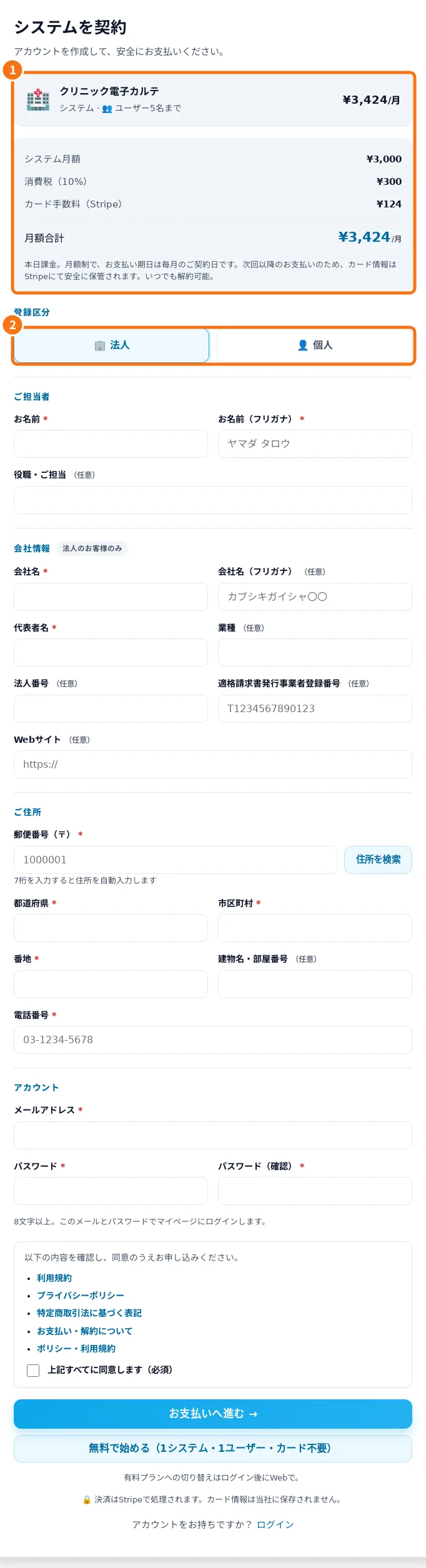
Demo screen. Numbered highlights mark the controls discussed; the image language may differ from yours.
Tip
If something goes wrong
For disputed billing or suspension, give support a reference and status without passwords or card data. Do not assume an automatic deletion deadline without checking your account terms.
Related articles
- FAQ: 20 answers