











KOREOS · 界面与功能
Tasks: how to use
Creating tasks, switching views, filtering and completing them.
此文章暂无您的语言版本,以English显示。
本页目录
What it is
Tasks lets you create activities with an owner, a deadline and a priority, and follow progress together with the team. You can comment, attach files and receive reminders before the deadline, so nothing is forgotten.
Who it is for
It works for organizing your own personal list as well as for managers who want to see and rebalance the team’s workload.
Step by step
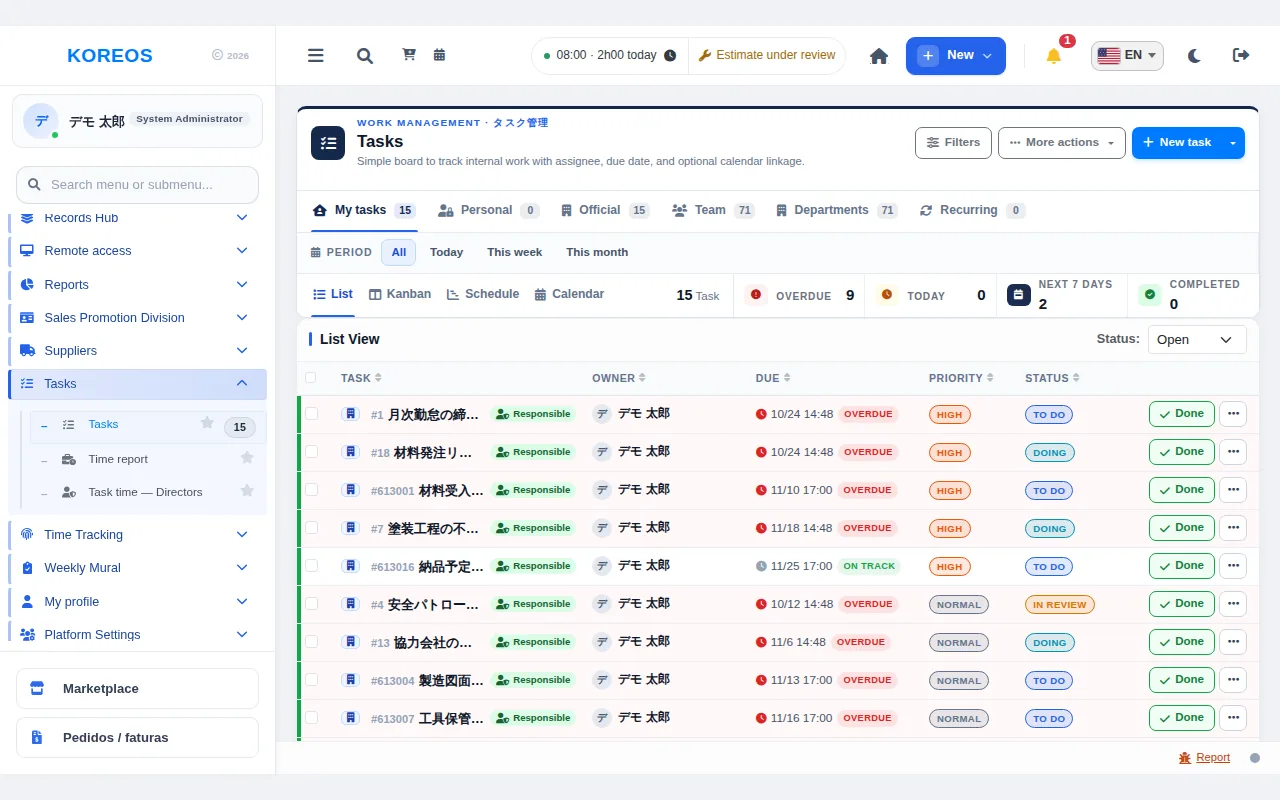
- In the menu, open "Tasks". The tabs at the top switch between "My tasks", "Personal", "Official", "Team", "Departments" and "Recurring".
- Click "New task" and fill in the title, description, deadline and owner; then save.
- Choose the view: "List", "Kanban", "Schedule" or "Agenda". The list shows owner, deadline, priority and status.
- Click the numbers at the top (Overdue, Today, Next 7 days, Completed) to see only tasks in that state.
- Open "Filters", enter a keyword, status, priority or deadline and click "Apply filters".
- When the work is done, click "Finish" on the task’s row. Keep the status updated as work moves along.
- Managers can use Kanban and drag a card to another person’s column to change the owner.
Tips
- Use personal tasks for your own reminders and official tasks for work requests.
- Realistic deadlines help you prioritize the day.
- Anything that repeats every week or month can go under "Recurring".
- In "Schedule", each task is a bar from start to deadline, so overlapping dates are visible at a glance.
Common questions
Can I assign a task to someone else?
Yes, you set the owner when creating it. People with permission can also move the card to another column in Kanban.
How do I see only my tasks?
Use the "My tasks" tab or the filter of the same name.
How do overdue tasks appear?
The overdue total shows at the top and the rows are highlighted in the list.
Availability and plan: see the Marketplace article.