











KOREOS HOME · Màn hình & chức năng
Owner, administrator and member
Roles control who may manage household members and the subscription.
Bài viết này chưa được dịch sang ngôn ngữ của bạn: đang hiển thị bản English.
Trong trang này
What this is for
Roles control who may manage household members and the subscription.
Step by step
- Open cloud Settings and Family to view members and roles.
- Members view the list; administrators may remove ordinary members when permitted.
- The owner can assign administrator/member and review access.
- To transfer ownership, verify the person and billing implications; confirm with your password when asked.
- Refresh the list and verify the resulting role after changes.
Join the household with an invitation (1.2.2)
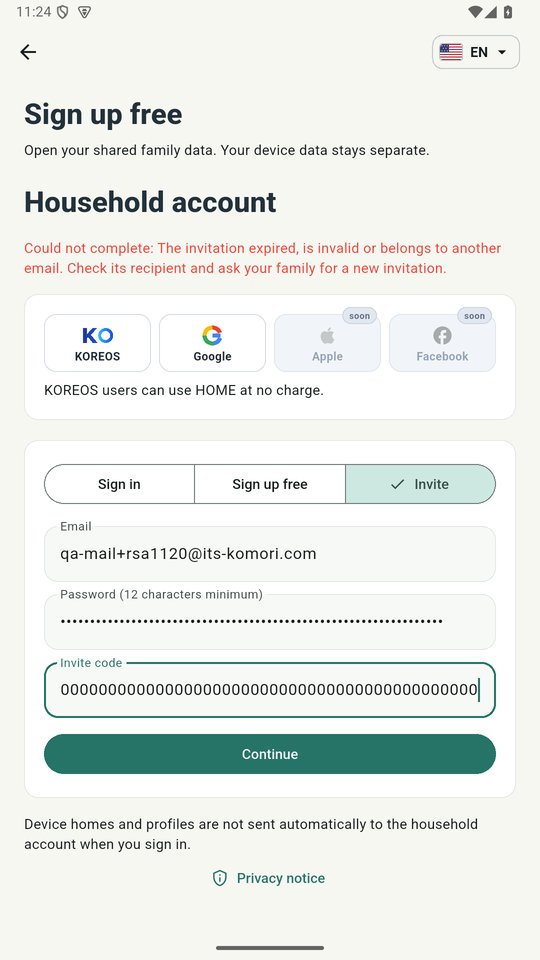
- On the first screen, tap Sign up free, then the Invite tab.
- Enter the e-mail that received the invitation, a password and the invite code; tap Continue. You join the inviter's household — no new household is created.
- Prefer Google? With the code filled in, tap Google: the invitation also applies there, and your chosen language is kept.
Tip
If something goes wrong
If management is absent, check your role. Do not share the owner password to bypass permissions.
Related articles
- FAQ: 20 answers