











- ImprovedOpen My profile → Commute route to see the driving route between home and work, with one-way and round-trip distance and estimated time. The route uses your registered address and marks approximate locations. The time clock shows a summary linking to your profile. The allowance distance changes only after an attendance approver confirms it; map photos remain optional attachments.

Modular business system
KOREOS
Pick only the modules your company needs: tasks, calendar, stock, purchasing, manufacturing and more.
What’s new
- NewIn the event’s “Target companies” tab, AI reads the exhibitor list and shows the companies with the best fit for KOMORI: 0–100 score, reason, matching business line and what to offer at the booth. Cards captured in Karta appear alongside. Filter, print on A4 and track from candidate to met.
- ImprovedThe logo now appears without a white box, with a light orbit and gentle motion. The progress bar continues between pages. The screen follows your light or dark theme and reduced-motion setting. Downloads keep navigation free.
- NewProject onto this wall opens mapping on the projector or turns a single screen into a wall editor. Draw polygons, lines, ellipses and freehand strokes; shape curves with handles or start from arc and L-corner templates. Calibration and content follow the curve live. Esc returns to the editor.
- NewThe city runs 24 hours. Human presence comes from the time clock. Lit machine windows indicate occupied slots; amber means a restriction. Click a district, robot, task or message to inspect the real evidence. Human permission requests appear in amber. Observation robots do not repair. Old snapshots are marked; their movement is only a visual patrol. Operational text in its original language
- NewKenko has a new Alpha · Hologram look: a blue particle bust, rings around the head and mountains with golden veins that react to the real state — Listening (rings pulse with the microphone), Thinking (a golden glow rises) and Speaking (the orange wave follows the voice). Full screen shows only the hologram and captions, ideal for ultrawide monitors. Direct link: easy_kenko?mode=alpha (TV: &tv=1). Guide: Kenko (web) Alpha mode.
- ImprovedIn Kenko’s Alpha look (easy_kenko.php → Preferences → Appearance → Alpha) the hologram comes alive: the eyes blink on their own, the iris looks at your face when the camera is on, and the mouth and smile form in the face lines. She smiles when greeted or thanked, is attentive while listening and looks up while thinking. Particle arms and hands appear only on real events: she waves when someone arrives or says goodbye, raises a hand when you talk with the microphone off, explains with an open hand, points at the result and puts a hand to her chin while thinking. The expression in “AI status” is the same one the face shows. Panels are now dark glass: Activity with chat bubbles and times, Actions with icons, Preferences in titled sections, a framed camera preview, and a bigger bottom box with Talk, Send, Stop, ready-made shortcuts and a clearly visible status. Panels remember whether they were open and the last tab. Try it: say “Hi, Kenko!”.
- ImprovedIn Kenko’s Alpha look (easy_kenko.php → Settings → Appearance → Alpha), the head no longer looks like a helmet. It is now a human head seen from the front, as in the reference hologram: a rounded skull, temples, ears, jaw, chin and a neck slimmer than the head. The face is made of horizontal lines that cover the front of the head. They are orange in the middle of the face, which is taller than wide, and blue on the forehead and sides. A thin, bright blue edge draws the jaw and chin. The contour rings around the head are gone, and a mist of particles rises from the top and sides, livelier while Kenko listens or speaks. Everything else (mountains, rivers, veins, STATUS) is unchanged.
- ImprovedKenko's Alpha look (easy_kenko.php → Settings → Appearance → Alpha) was rebuilt: the bust now fills ~85% of the height, full of bright particles and contour lines; the whole face is an orange mass of waves that breathes when idle and ripples (and warms up) with the real voice; golden veins run from chin to chest; thin rings sit behind the head; and bright blue mountains with golden rivers fill the sides (full sides on 21:9/32:9, smaller on 16:9, bust only in portrait). STATUS is small to the right of the head, a small panel sits top-left and in full screen the caption shows large at the bottom.
- ImprovedThe wide orange (clock-in) and yellow (maintenance) banners are now a small pill next to the search box. It shows the pending punch or, after clocking in, your entry time and time worked today. Maintenance shows as an amber wrench with the full notice in a card. On mobile, tap to open. Guide: Topbar status island.
- NewEvery /saas page (KoMail, KOCHAT, Karta, KMR, Kenten, KŌLOGY, KoLite, HOME, Docs, Budget, KOREOS) now has the same 6 tabs: Dashboard, Accounts, Plans & pricing, Billing, Activity and Settings. KPIs and charts by period (revenue = same figure as the DX ledger), one-line-per-account list, details and actions inside a modal. Suspend, change plan, grant credits etc. ask for a reason, are audited under your name and run through the product's own functions. Updates live.
- NewAt the top of DX Finance, the "Forecast" button shows expected income (tax included), expected costs and the balance for the next 3, 6 or 12 months, with a chart and three big numbers. Click a month to see where each amount comes from (invoices, contracts, fixed costs, payroll), with closed amounts kept apart from estimates (exchange rate, after the contract term…). "Print / PDF" produces the KOMORI-standard A4 sheet.
- ImprovedAnalytics now brings together daily visits, estimated unique visitors, weekly comparisons, readable pages and icons, source logos, countries, devices, languages and busy hours. Bots are separate. It starts at 30 days and lets you choose dates. How to use opens the illustrated guide. City is not collected.
- NewReport web, app and TV problems from Report Center. Choose “Report a web, app or TV problem”, select the product and platform, and enter the version. Attach a screenshot or screen video (MP4, WebM or MOV, up to 15 MB). The Report Center guide explains how to report and follow the response.
- NewNew page in the DX menu (below Downloads): call history for 0532-35-9001 (list/table, period, status, language and outcome filters, search), transcript and timeline, Kenko on/off switch (with confirmation and reason, logged) and live state of the extension, the service and the call in progress.
- ImprovedEach call shows recording, transcription, summary, task and notice milestones. Check retries, the next time in JST and failure reasons. History, messages and call details update in realtime.
- ImprovedCaller speech produces one official shared task, with JA/PT/EN summaries and a protected reference to the original recording. Silence remains in history; ambiguous old audio awaits review. Attachments show permission and expiry states.
- ImprovedCalls, stages, handlers, messages, summaries and counters update while filters and tabs stay in place. Status shows a call timer. During disconnection the page checks for changes every 45 seconds. Final activation and verification with an authorized QA account remain pending.
- ImprovedHistory, analytics, messages, settings and status now use tabs. Settings use full-page cards, recipient search and footer buttons. Print a day, date range or one call with a list and summaries; full transcripts require reading permission.
- ImprovedWeb purchase requests now suggest Stock or Fixed asset from the item and unit price, with a reason. Above ¥200,000 per unit before tax, fixed asset is required. Receiving starts with the saved purchase choice. Paper, cables, chargers and earphones are consumables; printers, PCs and machines are equipment. See the Wiki/Guide. The new native app field is prepared for the next validated release.
- ImprovedToday’s agenda (Operations Center v2) rebuilt as a day calendar: work-hours timeline with a now marker, one band per department, each person with photo and name and blocks at the right time (schedule, meetings, today’s official tasks, absences). Old overdue tasks are only a counter; the current or next department meeting is highlighted in the footer.
- NewOperations Center v2 adds Today’s agenda with official tasks by department, photos and Japanese names. Included in automatic rotation.
- NewThe agenda footer highlights the current or next department meeting with a countdown.
- FixedShared accounts keep the language on each device. A discreet calendar icon sits beside pause.
- ImprovedRefreshed web stock: prominent reader status and operator, search as you type, grouped locations and type filters with counts. Cards show photos, codes, locations and balance levels. Location assets, item details and history stay together, with automatically closing confirmation and layouts for phones, tablets and PCs.
- ImprovedWeb stock: the reader is always ready for badges and item QR codes. Withdraw, return and adjust in the item card with quick quantities, temporary operator identification and immediate balances. History includes photos, people, balances, filters and pages.
- NewLogistics → Driver Ranking now has a «Team» tab: one row per person, with photo, showing days worked, daily reports sent, deliveries, km driven, roll calls and hours. Pick Today, This week, This month, Last month, Last 7/30 days or your own dates; «Save this period» makes a ★ shortcut. Click a column title to sort and a person to open their daily reports. The numbers match the daily report list (km from the odometer).
- ImprovedA small "official app" bar now appears at the bottom of the screen (on phones and computers). Tap the App Store or Google Play badge to open the store page. On a phone, only your device's store is shown. Tap × and it stays hidden for 30 days. The same applies to the web version of KOREOS, KOCHAT, KŌLOGY, KMR, Karta, Kenten, KoMail and KOREOS HOME.
- ImprovedThe "Install app / Add to Home Screen" prompt is gone. On your phone, please use the official app from the store. If you added it to your home screen before, it keeps working as usual.
- ImprovedChanging the language is now a drop-down list with flags. The header, login, public pages, print screens and TVs all use the same button: tap it and pick from the list with each language's flag and name (日本語, Português, English…). It also works with the keyboard and the TV remote (↑ ↓, OK, Back).
- NewDX · KOMORI Software online sales: KOLOGY Software Lite (¥385,000 incl. tax), KOREOS MENT and K-Units can now be bought at its-komori.com (Pro stays quote-only). Once the card payment is confirmed, DX automatically creates the client, an accepted quote and paid invoices; the customer downloads from “Software” in the portal. Monthly support (¥55,000 incl. tax) is optional and auto-renews.
- NewDX · Costs: “Record this month’s charge” button. It suggests the date (due day), the service card and the yen amount using the rate of the charge DAY (showing the math, e.g. US$ 200 × 154.18 = ¥30,835). The payment goes to the Finance JP dossier with you as the author. Receipts that arrived at contact@ are attached with one click.
- ImprovedDX · Costs: each service now stores which card it is charged to, and every change of plan, amount, due day or card goes to a timeline (before → after, date and who changed it). A month already paid is never recalculated.
- NewDX: creating and editing a quote is now a 5-step page — Client, Scope, Amounts, Terms and Review. Each step tells you what is missing, saves itself when you move on and shows the total with the 10% tax kept separate (before tax + tax = total). Discounts in ¥ or %. Shortcuts: Ctrl+Enter next, Ctrl+S save, Alt+1…5 jump to a step. Works on the phone.
- ImprovedThe last step shows the quote document itself (the same one that becomes the PDF), a checklist, the public link, Issue (it becomes “Sent” and the client can accept through the QR) and Send by email in the client's language. The “New” and “Edit” buttons in the list and on the client page open this page.
- NewKOREOS now speaks 7 languages: besides Portuguese, Japanese, English and Tagalog you can pick Simplified Chinese, Vietnamese and Spanish. Click the flag at the top (or on the login screen) and choose. It also applies to the client/supplier portal, KMR, KŌLOGY, KOCHAT web and the website.
- ImprovedText not yet translated in the new languages shows in English (never Portuguese) and is filled in automatically within minutes whenever a new screen is added.
- NewKOREOS Voice: now also records the SOUND of an online meeting (Google Meet, Zoom web, Teams web). Under “Source”, pick “Meeting + my microphone”, click Record and, in the browser window, select the meeting tab with “Also share tab audio” on. The others’ speech (from the tab) and yours (from the microphone) show up transcribed and translated, with a level meter for each source.
- ImprovedWith meeting audio, each change of speaker becomes its own sentence: Japanese, Portuguese and English switching quickly no longer get mixed in the same chunk, and each sentence is translated into the other two languages. Works in Chrome and Edge on a computer; Safari, Firefox and phones keep the microphone only (the “?” button explains where it works).
- NewDX: printed/PDF quotes now carry a QR. The client scans it, types the quote number and, on the same page, accepts, signs the contract, pays (bank transfer with receipt or online) and creates the Client Portal password — with no one from KOMORI involved.
- ImprovedA draft quote shows “under review by KOMORI” and opens acceptance by itself once marked as sent. When done, the client gets an e-mail and SMS with the portal and login ID (never the password), and the team is notified of the acceptance, signature and payment. To void a paper already handed out: “Revoke QR” on the print toolbar.
Recently updated
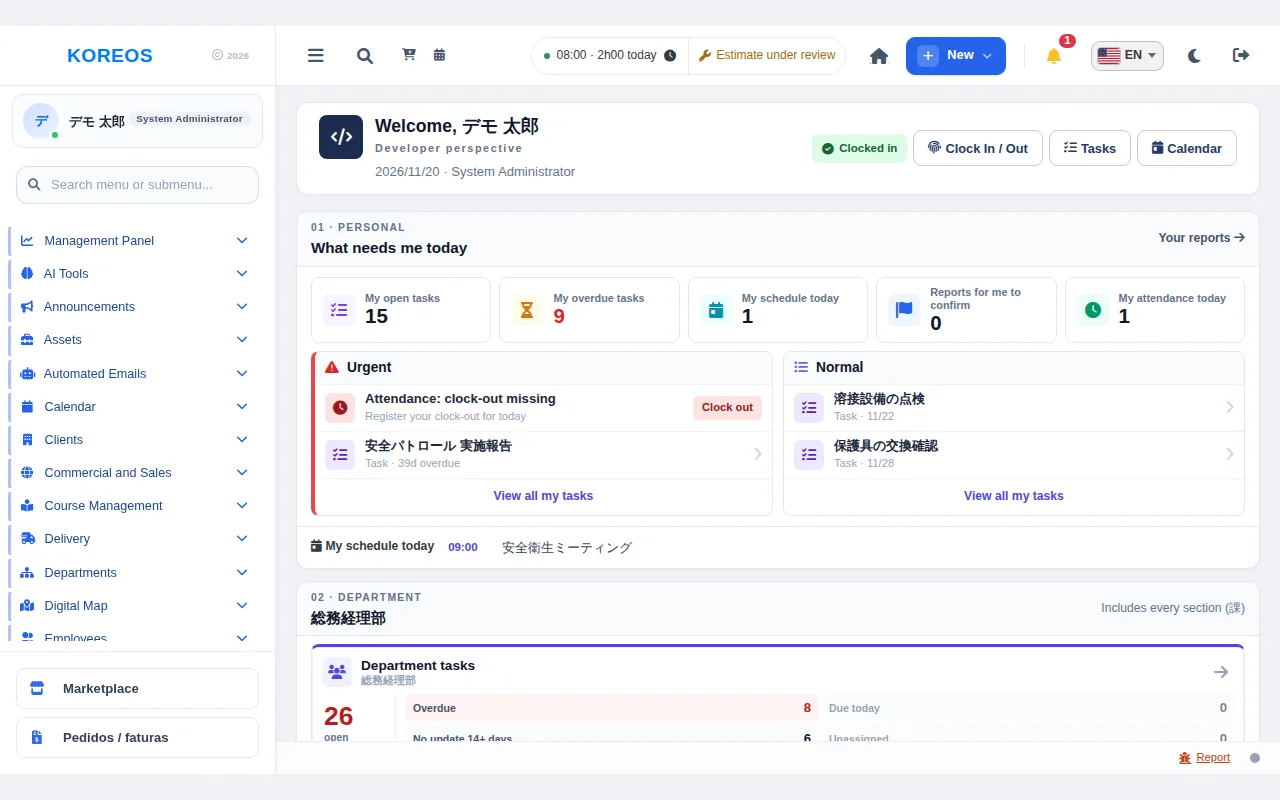 Getting started with KOREOS: signing in and the home pageWhat KOREOS is, how to sign in, how to read the home page, change the language and try the demo environment.
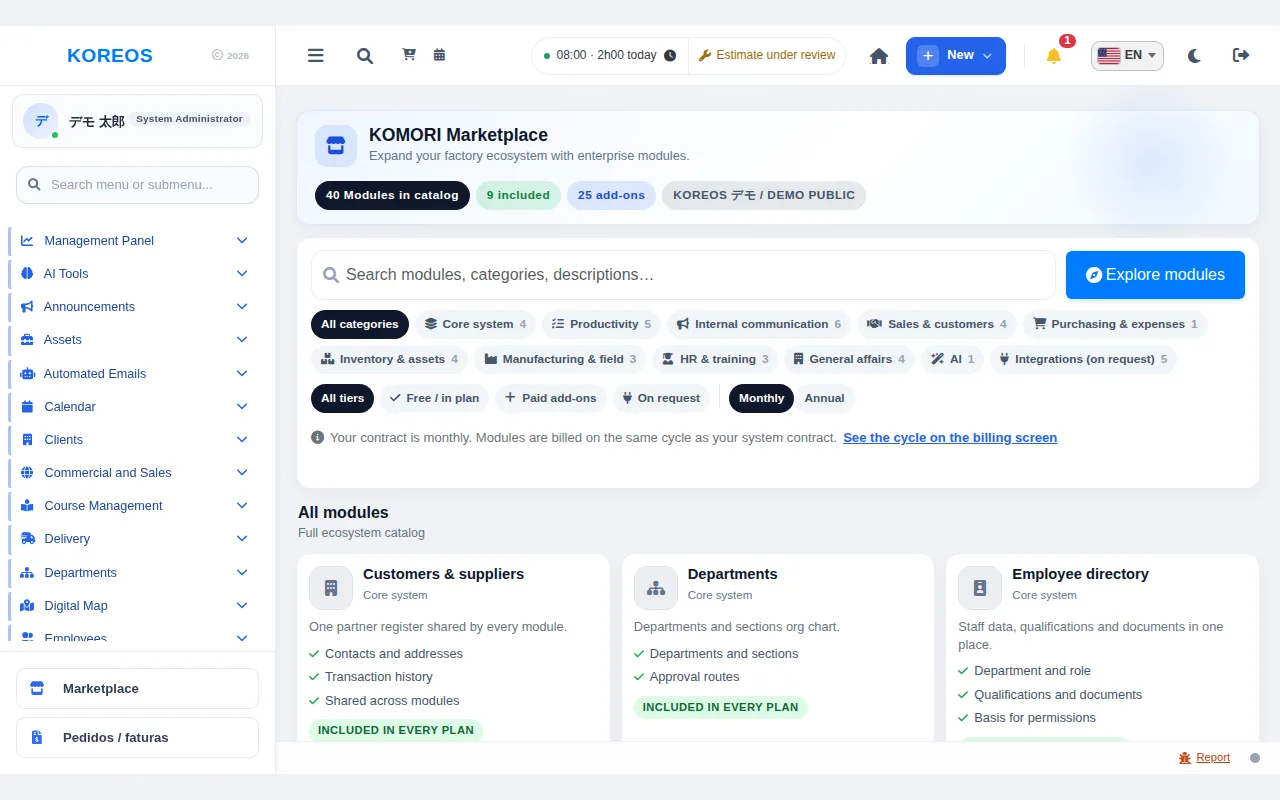 Marketplace: how to activate modules and plansHow to find, activate or buy modules, and how to read plans and prices.
- KOREOS frequently asked questionsQuick answers about modules, licensing, languages, the demo and passwords.
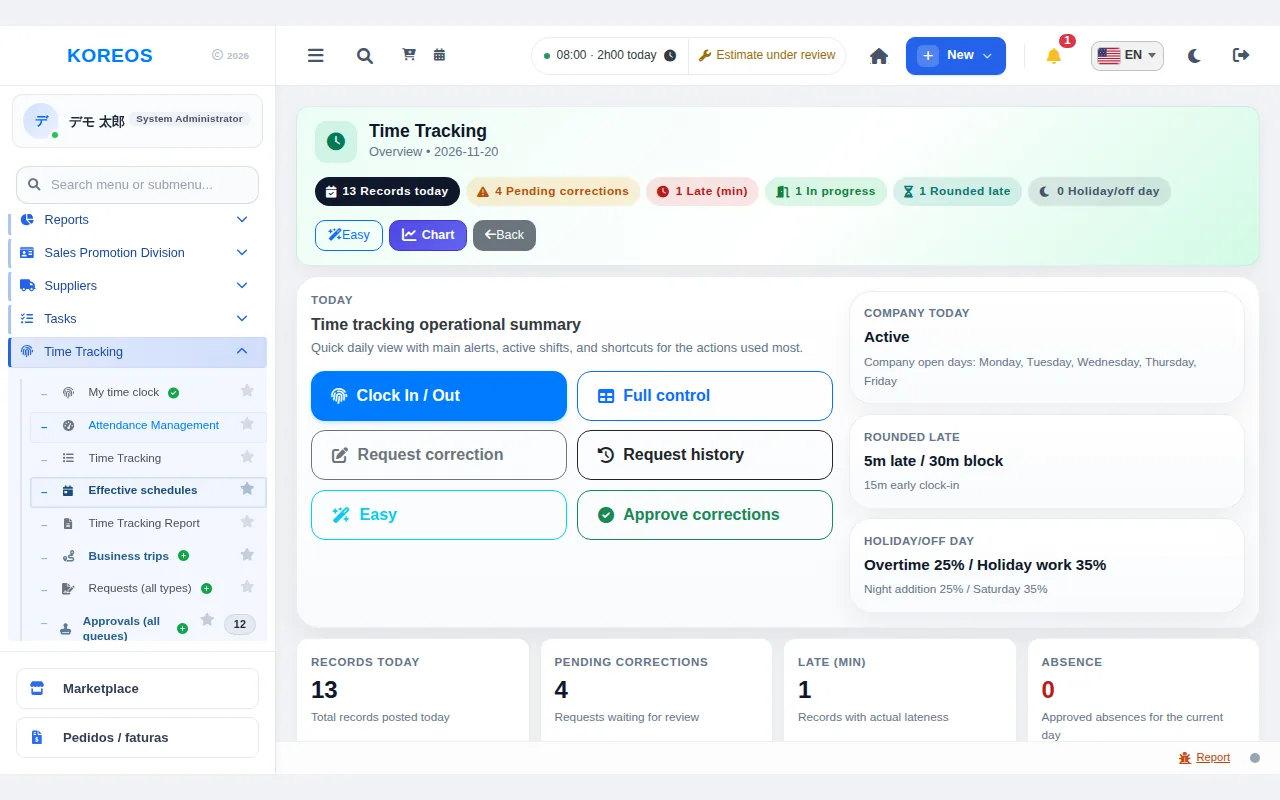 Time & attendance: how to useThe basic flow from clocking in to correction, absence and overtime requests and their approval.
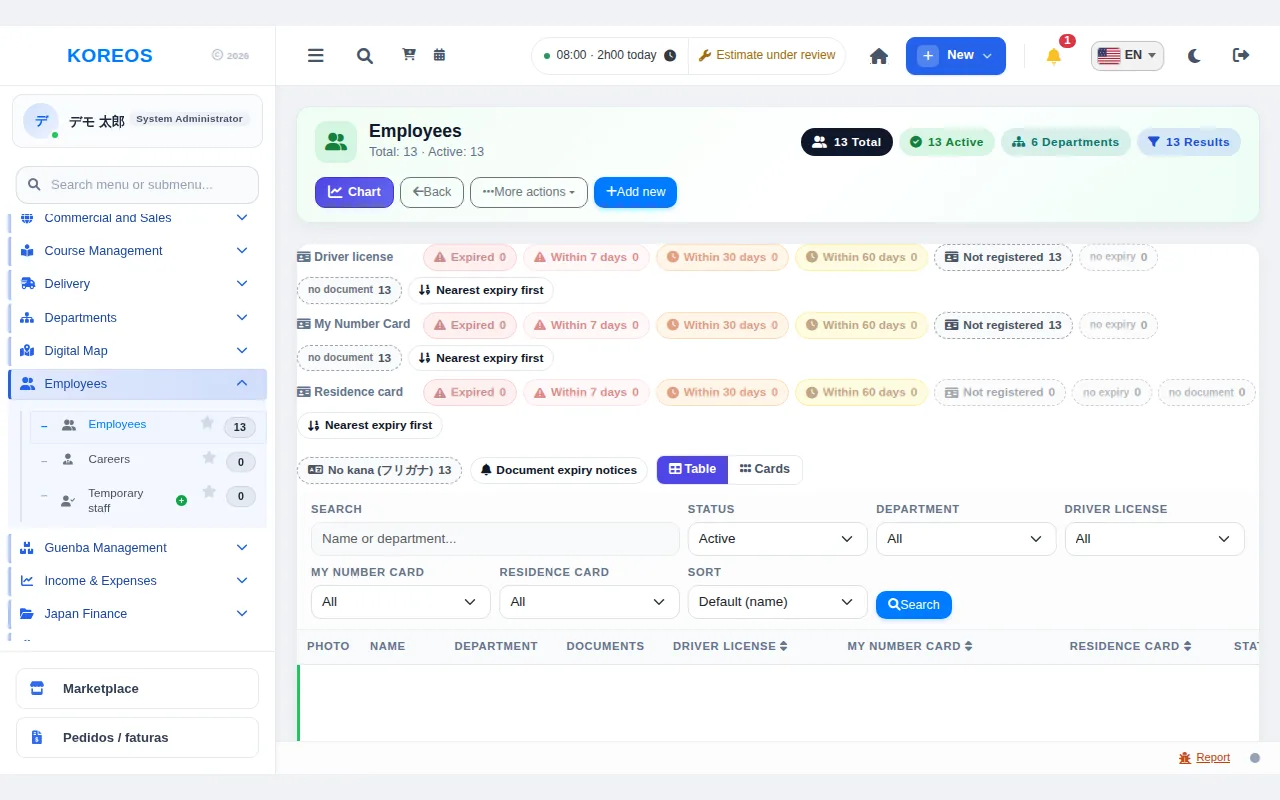 Employee directory: how to useFrom registering a person to managing documents and setting a resignation date.
- Customers & suppliers: how to useRegistering, searching, viewing details, importing and tidying duplicate customers.