











KOREOS · Screens & features
Proposals: how to use
AI builds the sales proposal from your client details and you follow everything in one list.
On this page
What it is
Proposals is the module where AI (Bella) builds a sales proposal from your client details, and you follow its progress in a list. The generated proposal can be reviewed, edited and downloaded as PDF or PPTX.
Who it is for
Sales reps who want a first draft of a proposal soon after a meeting, and managers who want to see every proposal in one place.
Step by step
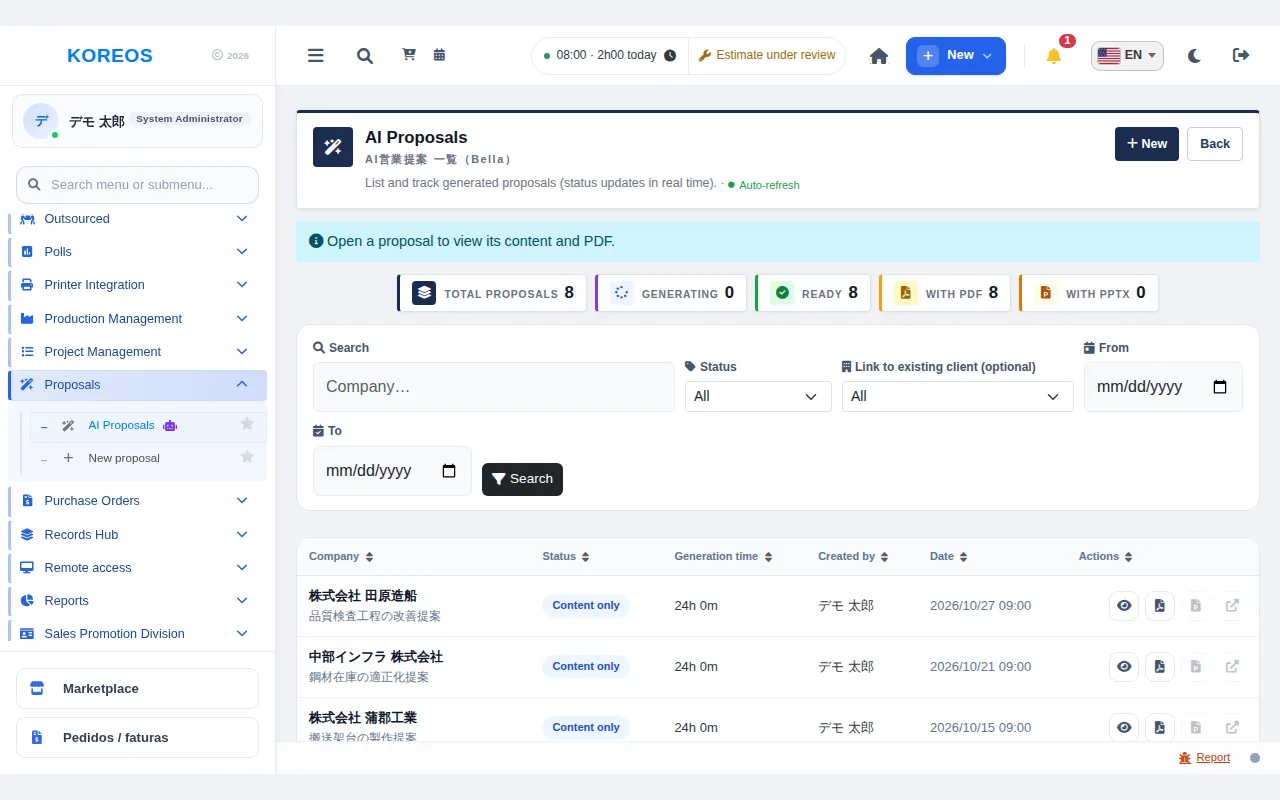
- In the side menu, open Proposals and go to "AI Proposals". At the top of the list you see the totals: "Total proposals", "Generating", "Ready", "With PDF" and "With PPTX".
- Click "New", at the top right.
- Under "Client details", fill in "Company" (required). Optionally also fill in "Link to existing client (optional)", "Segment / industry", "Contact", "Website URL", "Meeting notes / perceived pains" and "Client PDF (company profile etc. — optional)".
- Choose the "Interlocutor", the "Visual theme (Gamma)" and the "Output language".
- Click "Generate proposal". Generation runs in the background and the status in the list refreshes by itself.
- When it is ready, open the proposal with the eye icon in the list. You see the "Client analysis summary" and the content of each page, and you can download files with the PDF and PPTX icons.
- To adjust the text, click "Edit content", change "Title", "Subtitle", "Body (1 line = 1 item)" and "ROI / impact", then click "Save changes". Next click "Regenerate deck" and confirm: the presentation is rebuilt with your text (it takes from tens of seconds to a few minutes).
Tips
- The more client details you give, the more specific the proposal. In the meeting notes, write the pains you noticed in your own words.
- Linking a proposal to an existing client makes it easier to find later.
- You can filter the list by company, status, linked client and period.
- The status "Content only" means the text was generated but there is no PDF/PPTX presentation yet. Generating the presentation depends on an integration that the account administrator has to set up.
Common questions
How long does generation take?It depends on the content. The list shows "Generating" and changes by itself when it finishes.
The status says "Failed". What now?Check the data you entered and generate again. If it keeps failing, contact your account administrator.
Can I choose the proposal language?Yes, in the "Output language" field of the new proposal screen.
Availability and plan: see the Marketplace article.