











KOLOGY Software Pro · Màn hình & chức năng
Edit a delivery from the map
Quick editor on pin click, Full edit, AM/PM period with exact time, and the Selected tab.
Bài viết này chưa được dịch sang ngôn ngữ của bạn: đang hiển thị bản English.
Trong trang này
Wrong address, time changed, route swapped? Fix it right on the map. The change shows at once on pins, table and counts, without reloading the screen or losing the map framing. The original imported file is never overwritten: changes stay in the working batch.
Where it is
On the Dispatch map: click the pin, right-click the delivery, or double-click a row in the table. The panel's Selected tab also shows the current point.
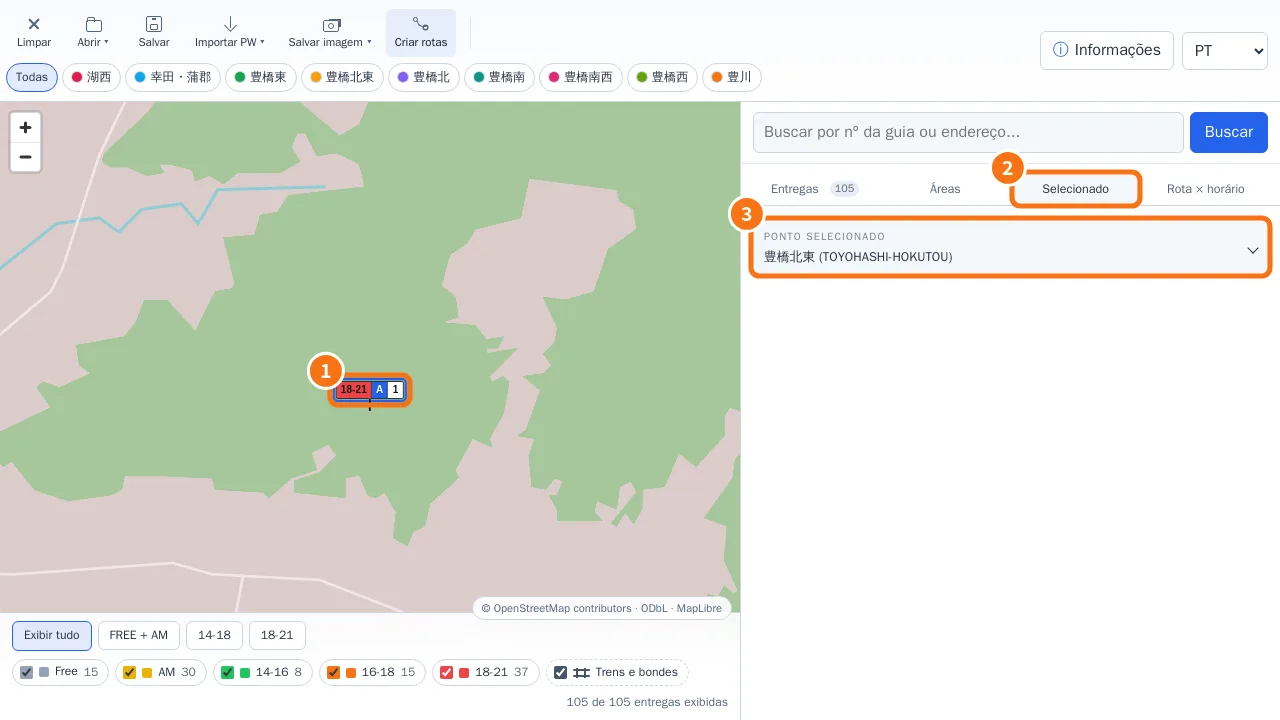
Step by step: quick edit
- Click the delivery's pin (①). It is highlighted and the Selected tab (②) shows the point and its area (③).
- The Edit delivery card opens with delivery number, driver (route), period, exact time and address.
- Under Period, choose No scheduled time, AM · morning or PM · afternoon/evening and enter the Time in 5-minute steps.
- Click Save. “Delivery updated.” appears.
Step by step: full edit
- In the quick card, click Full edit (or open it from the Selected tab).
- You can also change group, coordinates (latitude and longitude) and the optional fields of active extensions, such as cargo.
- Save. The pin moves if the coordinates changed.
How the time is classified
The full value, such as AM · 09:30 or PM · 17:30, is shown on the delivery. For filters, colours and the Route × time window matrix, the program files it under AM, 14-16, 16-18 or 18-21 automatically, keeping the time you typed.
In KOLOGY Software Pro
The editor also has an Assignment section: By route, Specific driver or No route or driver. See “How to assign a delivery to a specific driver”.
Common mistakes
- “Enter at least a delivery number or address.” A delivery needs one of them.
- “Choose AM or PM and enter a valid time for that period.” AM accepts morning times; PM, afternoon and evening.
- “Invalid latitude or longitude.” Use numbers with a decimal point (e.g. 34.76 and 137.39).
- Route is an A–Z list: without the Advanced driver identifiers extension, only letters A to Z are available.
Related questions
- Dispatch map: the main screen
- Delivery list and export
- Bases, cargo and daily stock