Kenten · Primeros pasos
Getting started with Kenten
What Kenten is, how to create a free account and how to find the essentials in Easy mode.
Este artículo aún no está traducido a su idioma: se muestra la versión en English.
En esta página
What Kenten is
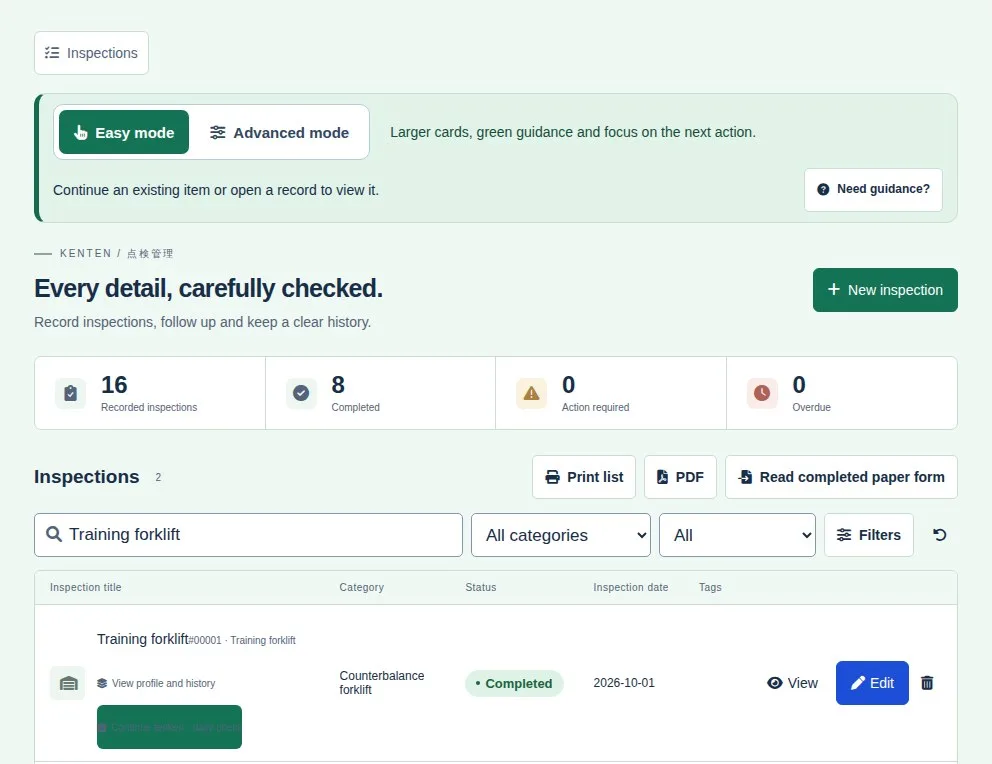
Kenten is an inspection (tenken) app for machinery, construction sites, vehicles and team routines. You pick a question template, check each item and every result is kept in the history.
Create your account
- Open kenten.its-komori.com in your browser and tap Create a free account.
- Enter your company and contact person.
- Confirm your email with the link you receive. Your Free workspace is created.
- From then on, use Sign in with your email and password.
Start with Easy mode
- At the top of the screen, choose Easy mode: larger buttons and a green screen focused on the next action. Advanced mode shows more tools in a compact blue layout.
- In the Inspections list, use the search to find an existing item before creating another.
- To start a new inspection, tap New inspection.
- Unsure about the current screen? Tap Need guidance?.