Kenten · Getting started
Getting started with Kenten
What Kenten is, how to create a free account and how to find the essentials in Easy mode.
On this page
What Kenten is
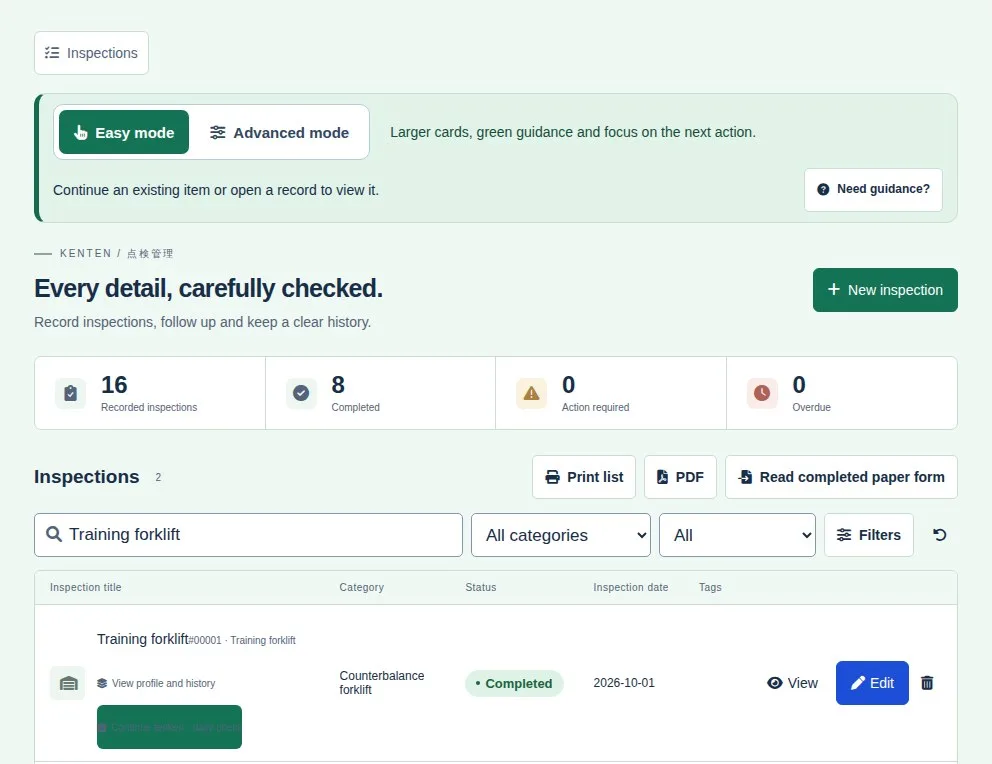
Kenten is an inspection (tenken) app for machinery, construction sites, vehicles and team routines. You pick a question template, check each item and every result is kept in the history.
Create your account
- Open kenten.its-komori.com in your browser and tap Create a free account.
- Enter your company and contact person.
- Confirm your email with the link you receive. Your Free workspace is created.
- From then on, use Sign in with your email and password.
Start with Easy mode
- At the top of the screen, choose Easy mode: larger buttons and a green screen focused on the next action. Advanced mode shows more tools in a compact blue layout.
- In the Inspections list, use the search to find an existing item before creating another.
- To start a new inspection, tap New inspection.
- Unsure about the current screen? Tap Need guidance?.