











K-Units · Pantallas y funciones
Dashboard: your stock at a glance
Value, items below minimum, reservations, open counts and today’s movements on one screen.
Este artículo aún no está traducido a su idioma: se muestra la versión en English.
En esta página
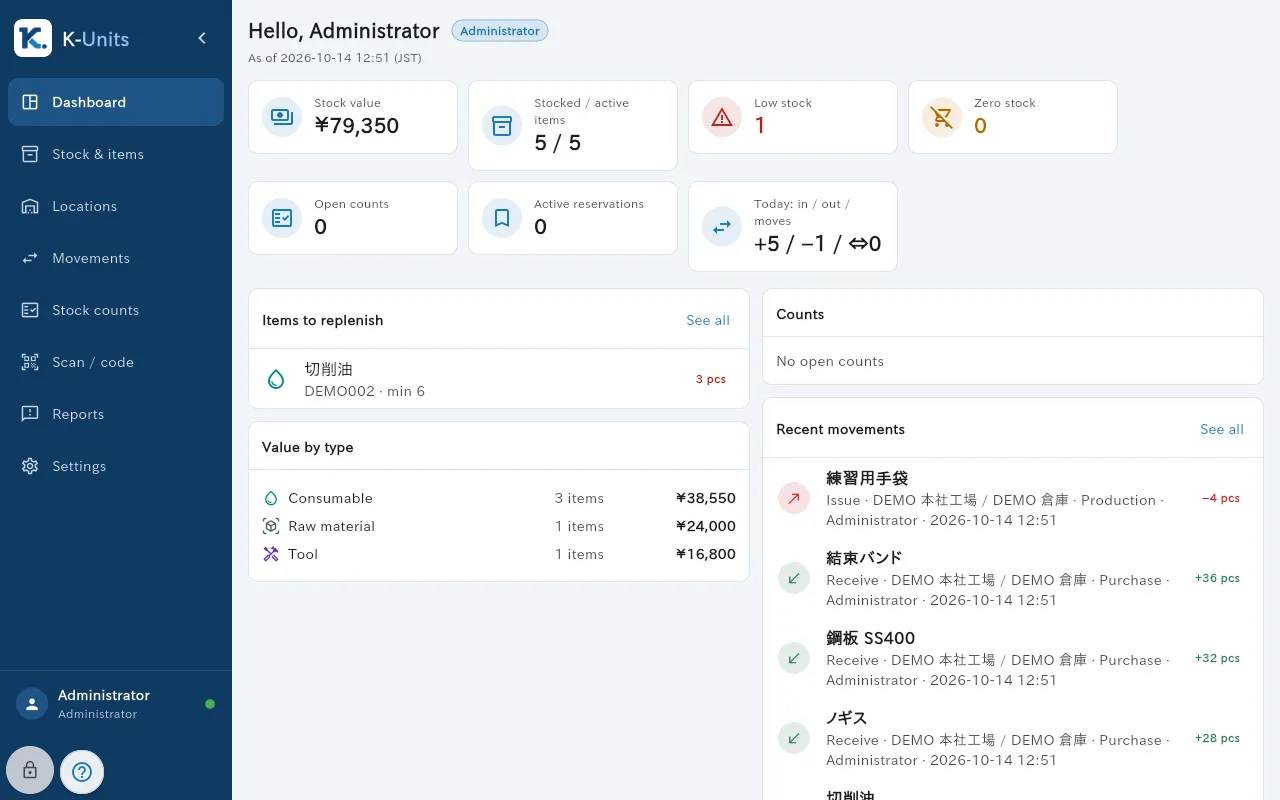
The Dashboard is the first screen after signing in. It summarises the stock you are allowed to see.
What is on the screen
- Cards: stock value, stocked versus active items, low stock, zero stock, open counts, active reservations, and today’s receipts, issues and transfers.
- Items to replenish: what is below minimum.
- Value by type: consumable, raw material, tool.
- Recent movements and open Stock counts.
- The menu on the left leads to Stock & items, Locations, Movements, Stock counts, Scan / code, Reports and Settings.
Common actions
- Tap a card or “See all” to open the matching list, for example the items to replenish.
- If “Your scope only” appears, the figures count only your departments and locations.
- The time marked (JST) under the title shows when the data was last checked.