











KOREOS · Mga screen at feature
Weekly board: how to use
Publish this week’s notices as cards with a set period on a board that can also appear on TVs.
Hindi pa naisasalin ang artikulong ito sa inyong wika: ipinapakita ang bersyong English.
Sa pahinang ito
What it is
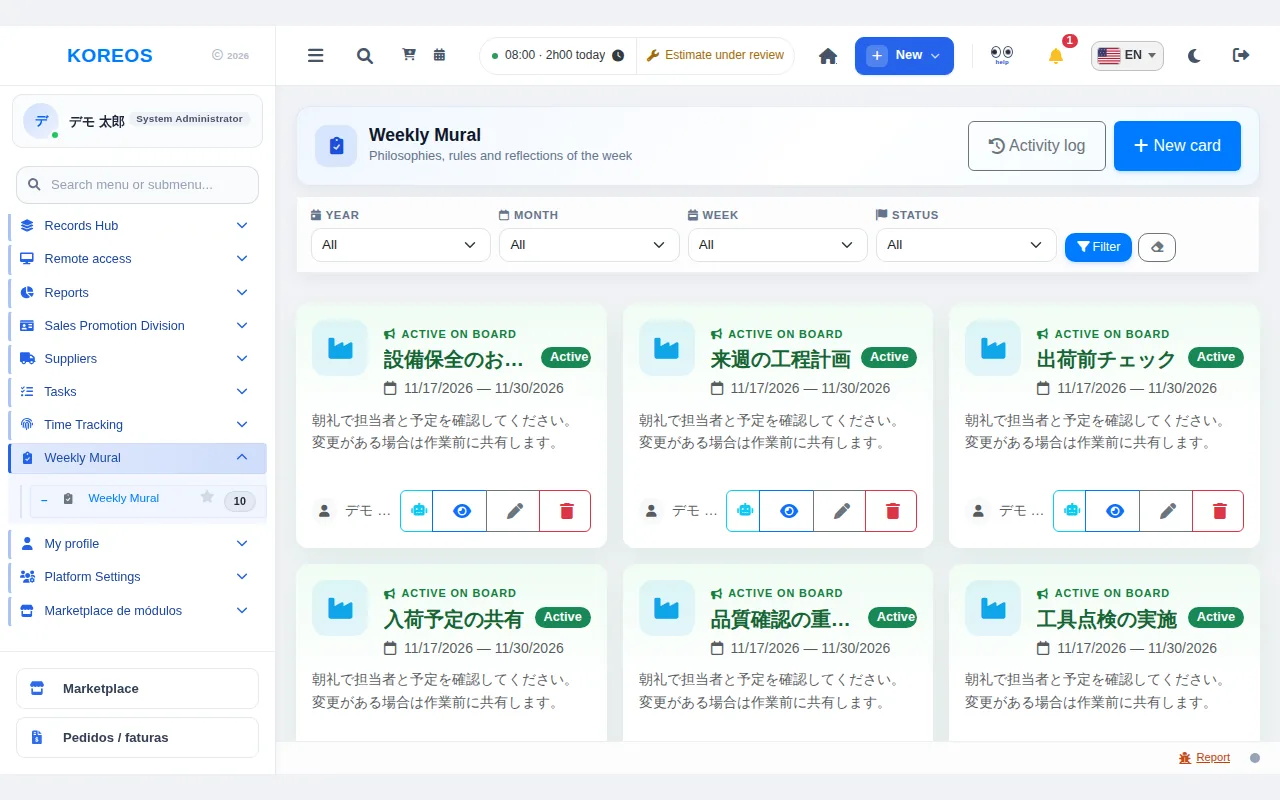
The Weekly board (shown on screen as “Weekly Mural”) gathers the week's notices, rules and reflections as cards. Each card has an icon or image, a display period and text in Japanese, Portuguese and English. The content can also be shown on TVs and tablets.
Who it is for
- Reading: every employee (you can open each card to read the full text).
- Creating and editing: people with permission to manage the board.
Step by step
- In the side menu, open Weekly Mural. Active cards appear first, at the top.
- To post a notice, click New card at the top right.
- Choose the icon (or upload an image), the Start and End dates and the Status (Active or Draft).
- In the JP / PT / EN tabs, write the Title and Description. At least one language must be complete.
- Click Save. Use the eye icon to preview how the card looks on the TV.
Tips
- Use Filter by year, month, week and status; the eraser button clears the filters.
- To take a notice out of circulation without losing it, set the status to Draft instead of deleting.
- Board managers can open the Activity log with creations, edits, deletions and activations.
Common questions
What if I set both an image and an icon?The image takes priority.
Can a deletion be undone?No: deleting removes the card and its image. If you may need it again, keep it as a draft.
Can I ask about a card?Yes, the robot button on each card opens an assistant chat focused on that card.
Availability and plan: see the Marketplace article.