











KOREOS · Mga screen at feature
Announcements: how to use
Creating multilingual announcements, setting audience and expiry, and tracking who has read them.
Hindi pa naisasalin ang artikulong ito sa inyong wika: ipinapakita ang bersyong English.
Sa pahinang ito
What it is
Announcements lets you publish notices to the whole company or to a department and check who has read them. You write in Japanese, Portuguese and English, and each person reads in their own language.
Who it is for
People who issue notices (owners and administrators) and every employee who receives them.
Step by step
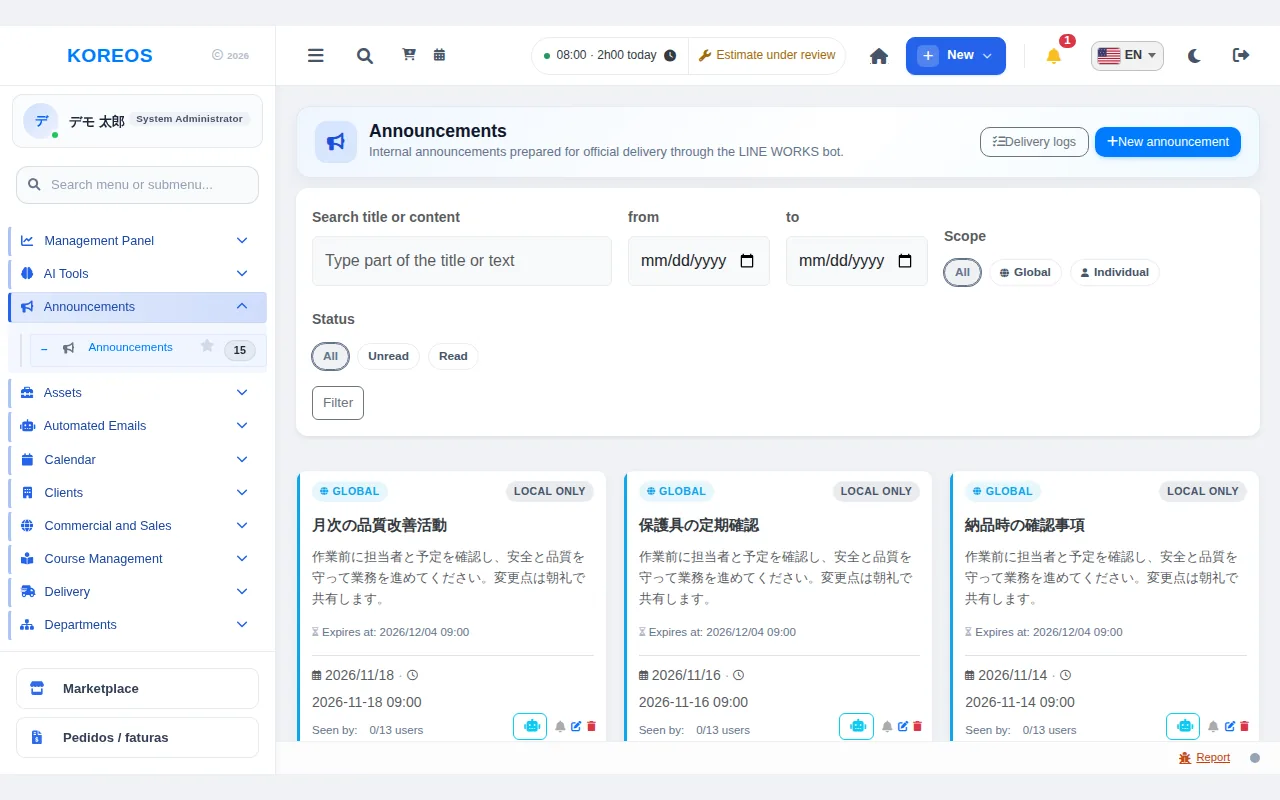
- In the menu, open "Announcements". The list shows the notices sent to you; you can filter by search, date, scope and read status.
- To read one, open its title, check the content and attachments and, if a confirmation button is shown, click it to register that you read it.
- If you can publish, click "New announcement".
- In "Announcement languages", fill in the title and content on each tab (PT, JP, EN). At least one language must have both fields filled.
- Choose the scope: Global (everyone) or Individual (selected people). If you want, attach a file and set an expiry date.
- Click "Create announcement": the recipients are notified.
- On the card in the list, see who has viewed it (for example, 0/13 users) and check the "Delivery log".
Tips
- With an expiry date, the notice leaves the list on its own after the deadline; left empty, it has no expiration.
- If a translation is missing, the system shows another filled-in language. Ideally, fill in all three.
- The "Unread" filter shows only what you have not read yet.
- Notification through LINE WORKS is available only if your company has set it up.
Common questions
Can I see who has read it?
Yes, from the counter on the card and the list of viewers inside the announcement.
Can I send it to only some people?
Yes: choose the "Individual" scope and select the recipients.
What happens to old announcements?
If they have an expiry date, they leave the active list automatically.
Availability and plan: see the Marketplace article.