











KOREOS · Mga screen at feature
Departments: how to use
Registering departments and sections, multilingual names, parent department and manager.
Hindi pa naisasalin ang artikulong ito sa inyong wika: ipinapakita ang bersyong English.
Sa pahinang ito
What it is
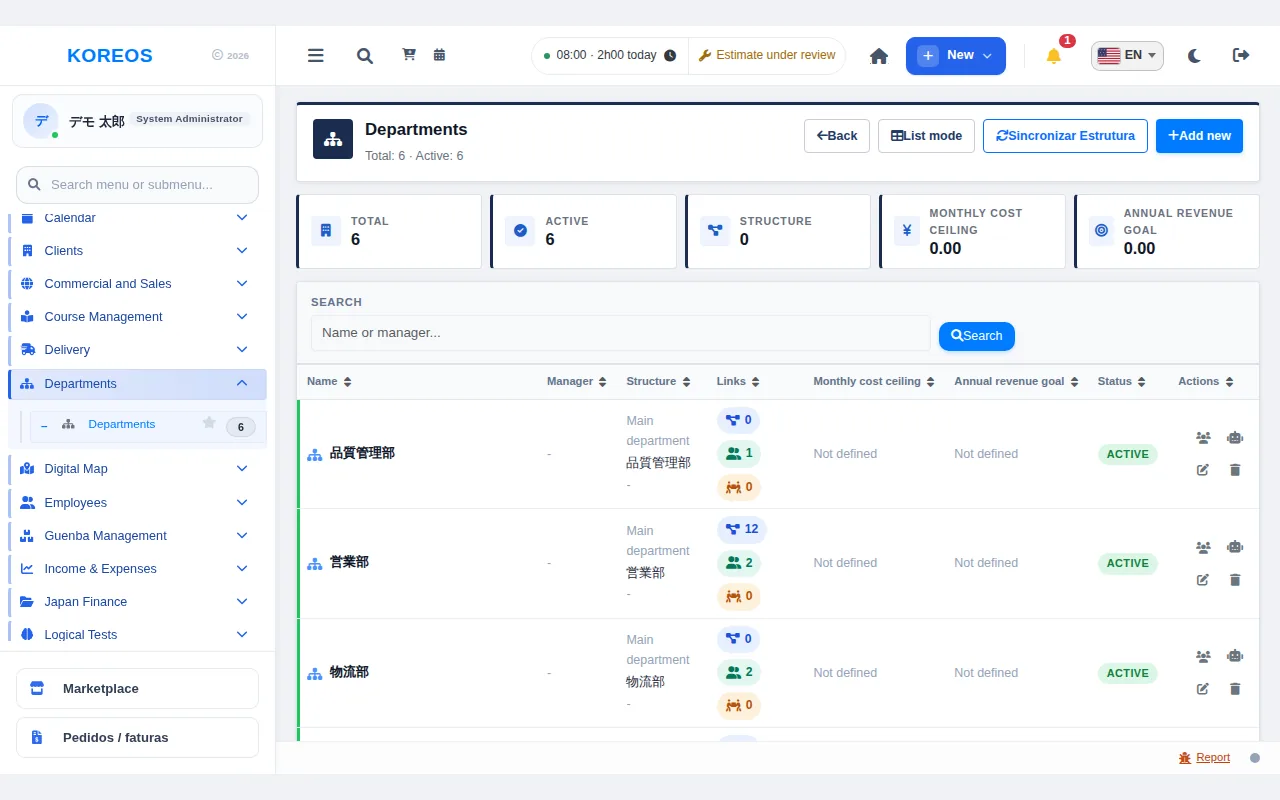
Departments is where you register departments and sections to build the company’s org chart. What you register here is used by approval routes, list filters and other features.
Who it is for
Administrators and HR staff who look after the company structure register and update it. Other employees see the department name in their own language.
Step by step
- In the menu, open "Departments" to see the list of registered departments.
- Click "Add new" to create a department.
- Enter the name in Japanese and in Portuguese (both are required). Filling in English and Tagalog is also recommended.
- If it reports to another one, pick the "Parent department". If it is top level, choose "This is a top-level department".
- Fill in the manager and the description. Several managers can be separated by commas or line breaks.
- If you want, set the "Monthly cost ceiling" and the "Annual revenue goal" (both optional).
- Click "Save". In the list, "View linked people" shows who belongs to the department and "Configure Permissions" adjusts permissions per department.
Tips
- Each person sees the department name in their own language; printed documents (ID badge) use the holder’s language.
- The list search accepts the department name or the manager.
- Sections are entered as departments linked to a "Parent department".
- Before deleting, the system asks for confirmation and the action cannot be undone.
Common questions
In which languages should I fill in the name?
Japanese and Portuguese are required; English and Tagalog are recommended.
How do I register a section?
Register it as a department and choose the department it belongs to in "Parent department".
Can I see who belongs to a department?
Yes, with "View linked people" in the list.
Availability and plan: see the Marketplace article.