











KOREOS HOME · 界面与功能
Home screen
Your family’s day at a glance and shortcuts to what you do most.
此文章暂无您的语言版本,以English显示。
本页目录
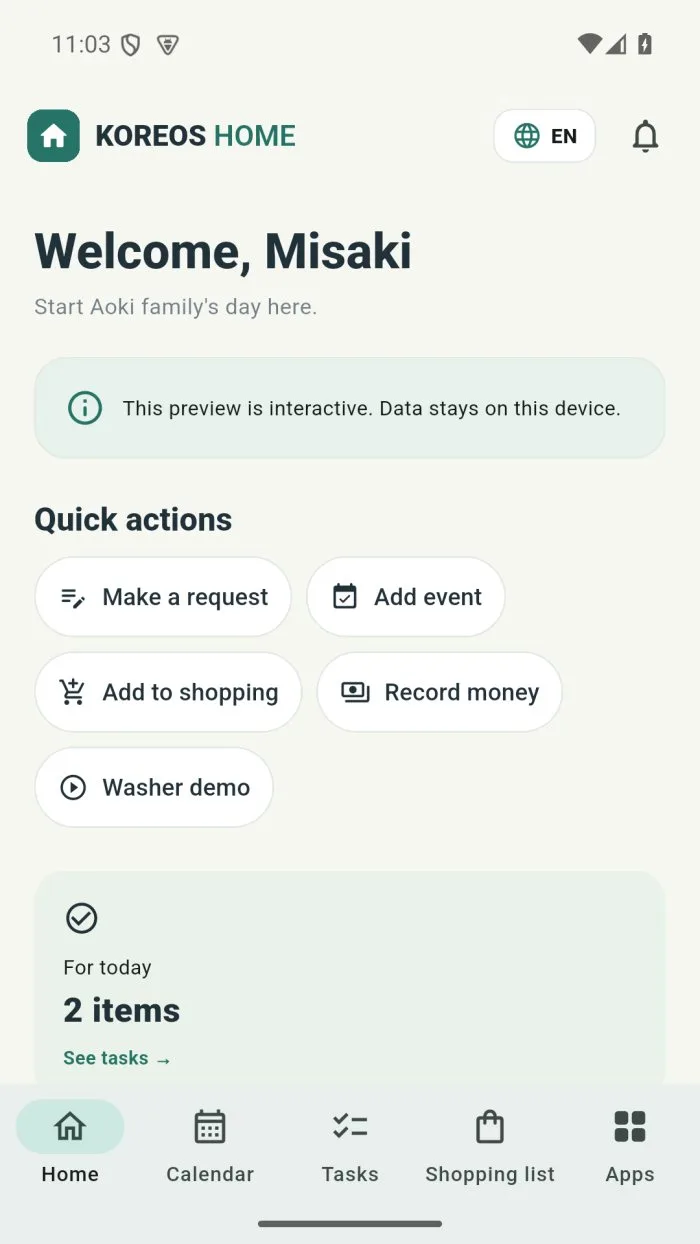
Home is the first tab in the bottom bar. It shows what matters today.
What is on the screen
- Quick actions: Make a request, Add event, Add to shopping and Record money.
- For today: how many tasks are due today, with the See tasks link.
- Coming up: the next events, with See calendar.
- Top: the language picker and the Notifications bell.
- Bottom bar: Home, Calendar, Tasks, Shopping list and Apps.
Make a request to someone at home
- Tap Make a request.
- Write the request (for example, “check the washer noise”). You can tap Speak to dictate or Photo to attach a picture.
- Choose who does it and by when, and save.