











KOLOGY Software Lite · 界面与功能
Intelligent route planning (Build routes)
Split deliveries among the drivers you pick, check the street paths, and only then apply.
此文章暂无您的语言版本,以English显示。
本页目录
The Build routes button opens Intelligent route planning. It analyses address coordinates, builds compact territories, balances the number of deliveries among the selected drivers and suggests a visiting order. Nothing changes in your deliveries until you confirm.
Who uses it and where
Whoever plans the run, on the Dispatch map, Build routes button in the top bar. In Lite it is the Intelligent route planning extension; in Pro it is included.
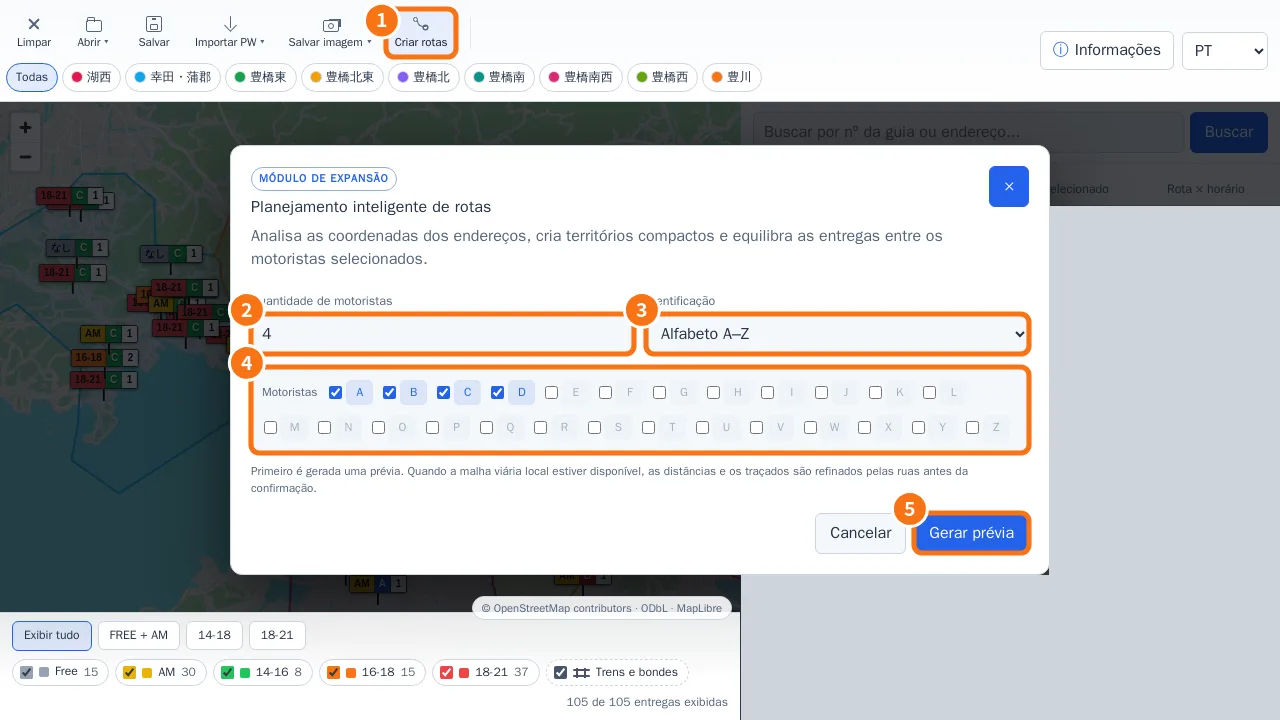
Step by step
- Click Build routes (①).
- In Number of drivers (②), enter how many will go out.
- In Identification (③), choose Alphabet A–Z or Custom names (names or codes separated by commas; in Lite this needs the Advanced driver identifiers extension).
- Under Drivers (④), tick only those taking part in this distribution.
- Click Generate preview (⑤). “X deliveries planned · distance” appears.
- Click View paths on map to check each path drawn along the streets. In Pro the window can be dragged aside so you can see the map without closing it.
- If it looks right, click Apply distribution. “X deliveries distributed successfully.” appears.
How the preview is calculated
- First a split by proximity. If the local street graph is available, distances and paths are refined along the streets before confirmation.
- A leg with an abnormal detour is replaced, only at that point, by an estimated link; the preview tells you how many estimated segments there are.
- Traffic and closures are not considered.
Common mistakes
- “Enter at least one driver.” Tick at least one box.
- “There are more drivers than valid delivery points.” Lower the number or import more deliveries with coordinates.
- “The route preview is no longer valid. Generate it again.” Deliveries changed after the preview. Make a new one.
- “This driver identifier is not available under the current license.” Use A–Z or purchase the identifiers extension.
Related questions
- Distance and street route
- Extensions and purchased features
- Schedule and distribution (Pro)