











KOLOGY Software Lite · 界面与功能
Delivery completion and daily report (extension)
Mark each delivery as completed, note occurrences and export the batch report as XLSX or CSV.
此文章暂无您的语言版本,以English显示。
本页目录
The Delivery completion screen tracks the day's batch in real time: what has been delivered, what is still pending, and progress. In KOLOGY Software Lite it belongs to the Delivery completion and reports extension and only appears if your licence includes it.
Who uses it and where
The operator who receives confirmations from drivers (by phone, for example) and records them in the office. Open Information → Delivery completion, or the top-menu item on inner screens.
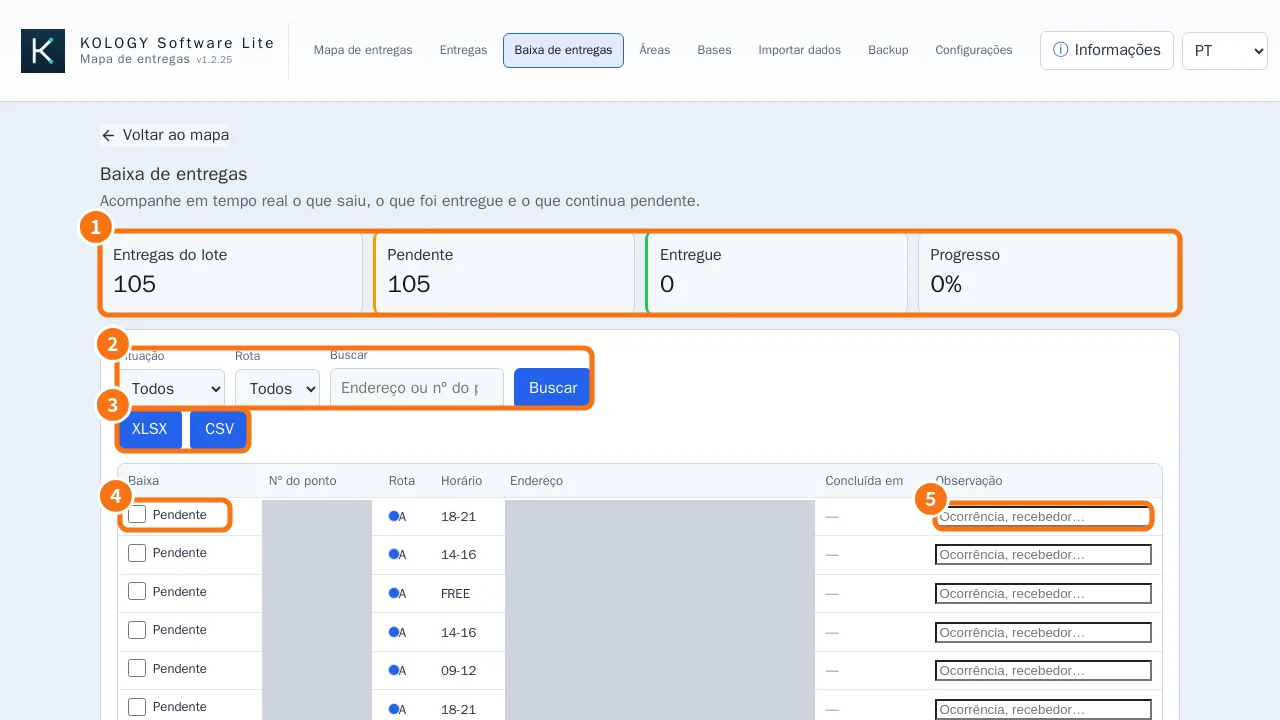
What is on the screen
- Indicators: Batch deliveries, Pending, Delivered and Progress (%).
- Filters: Status (All, Pending, Delivered), Route and Search (address or point no.).
- XLSX and CSV: export the report of what is filtered.
- Complete column: the box that marks the delivery as done.
- Note column: recipient, occurrence, return or instruction.
Step by step: record a delivery
- Find the delivery by route or type its number in Search.
- Tick the box in the Complete column. The status changes to Delivered and the time appears under Completed at.
- If needed, write a Note (e.g. “received at reception”).
- It saves immediately: “Delivery status updated.” appears. There is no Save button.
Step by step: end-of-day report
- Under Status, choose Pending to see what is left.
- Go back to All and click XLSX to file the whole day.
- Run a Manual backup before closing.
Common mistakes
- The screen is not in the menu: the extension is not purchased or has not synced yet. See “Extensions and purchased features” → Sync now.
- “The delivery could not be updated.” Reload the screen and try again; if it persists, close and reopen the program.
In KOLOGY Software Pro
Completion is included and adds recipient, photo and proof of delivery, and drivers can record it themselves in their portal. See the Pro articles on drivers and completion.
Related questions
- Delivery list and export
- Extensions and purchased features
- Backup and restore