











KOLOGY Software Lite · Mga screen at feature
Extensions and purchased features
See which add-ons are active on this computer, sync new purchases and open the add-on catalog.
Hindi pa naisasalin ang artikulong ito sa inyong wika: ipinapakita ang bersyong English.
Sa pahinang ito
KOLOGY Software Lite has a core (map, Aichi, import, areas, bases, backup, updates) and optional extensions. Only purchased features appear on the operating screens. A purchased extension belongs to your service and is unlocked on all of its activated computers.
Where it is
Information → Extensions.
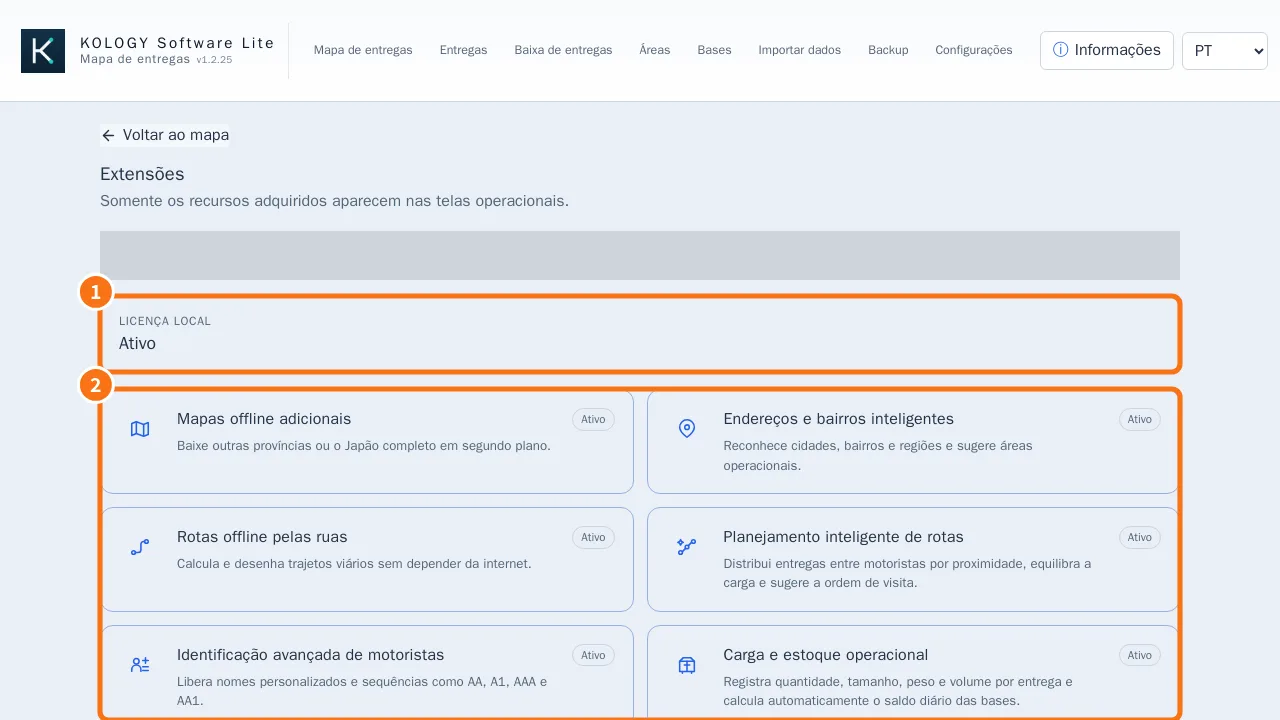
What is on the screen
- Local license: shows whether this computer's licence is Active.
- Extension cards, each Active, Not activated or Not purchased.
Available extensions
- Extension · What it unlocks
- Additional offline maps · Download other prefectures or all of Japan
- Smart addresses and neighborhoods · Recognises cities and neighbourhoods and suggests areas
- Offline street routing · Street distance and path, no internet
- Intelligent route planning · Build routes button: splits deliveries among drivers
- Advanced driver identifiers · Custom names and sequences like AA, A1, AAA
- Operational cargo and stock · Cargo per delivery and Daily stock at bases
- Delivery completion and reports · Delivery completion screen with export
- Custom delivery pin styles · Classic, Compact and Professional styles
Step by step: unlock a new extension
- Click Open add-on catalog. The client portal opens in the Windows browser.
- Choose and buy the extension in the portal.
- Back in the program, under Sync purchases, click Sync now. “Purchases and license synchronized.” appears.
- The extension turns Active and its screens appear.
In KOLOGY Software Pro
There is no per-module purchase: all of these features are part of the full edition.
Common mistakes
- I bought it and it does not show: click Sync now while online.
- “This extension does not belong to this license.” It was bought for another service or is not confirmed yet. Check in the portal.
- “Activate the core license before this extension.” Activate the program first.
Related questions
- Plans and limits: Lite vs. Pro
- Buy, install and activate
- Delivery completion