











KOLOGY Software Lite · Mga screen at feature
Bases, cargo and daily stock
Register fixed offices, depots and warehouses on the map and, with cargo enabled, track stock and expected balance per base.
Hindi pa naisasalin ang artikulong ito sa inyong wika: ipinapakita ang bersyong English.
Sa pahinang ito
Bases are the company's fixed places: office, depot or warehouse. They show on the map with their own pin, serve as references for measurements and routes, and are not deleted when you import a new batch. With cargo enabled, each base also tracks the day's stock.
Where it is
Information → Bases. At the top: Registered bases, Visible on map, Warehouse and Depot / Office.
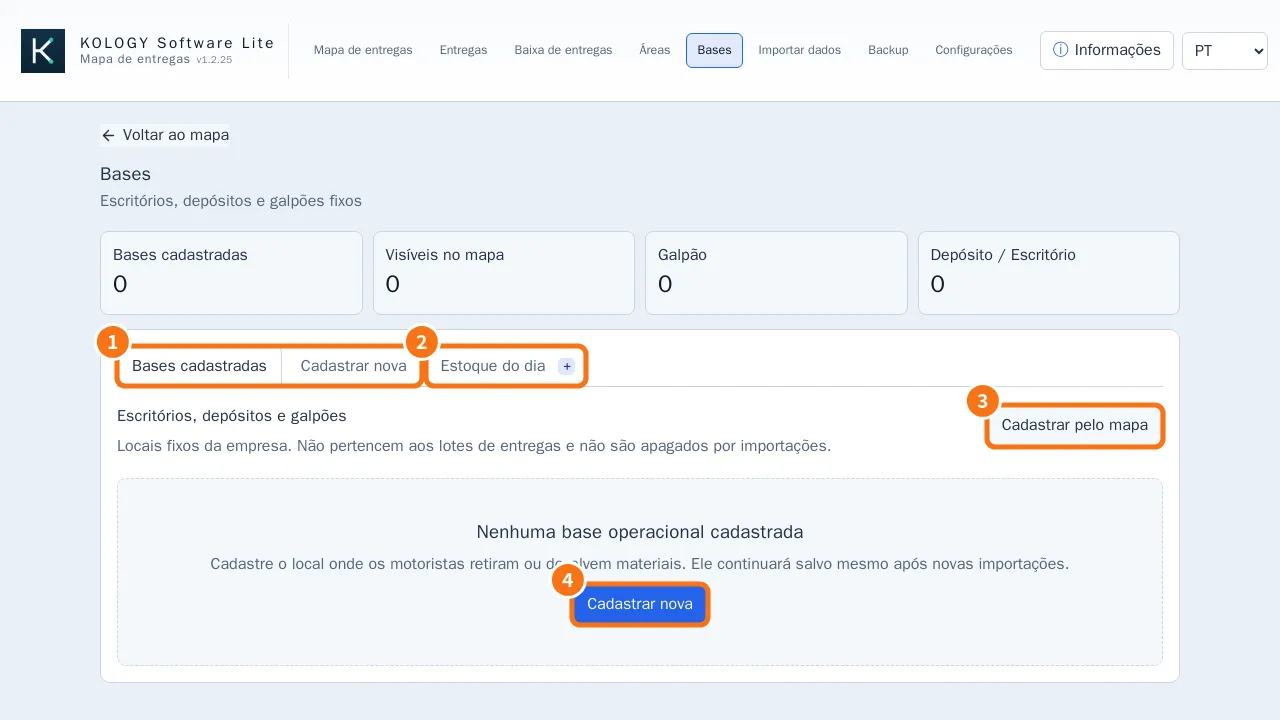
Step by step: register a base
- Click the Register new tab (①) or the Register new button (④).
- Enter Base name, Location type (Office, Depot or Warehouse), Address, Latitude and Longitude, colour, Order and Notes.
- Leave Show on map ticked and click Register base.
Faster: use Register from map (③) or, on the map, right-click the exact spot → Register an office, depot, or warehouse here. The coordinates are filled in.
Managing
- On the Registered bases tab, edit, use View on map, or untick Show on map to hide it (it stays registered).
- To remove one, confirm the deletion. Removing a base does not affect deliveries or drivers.
Cargo and daily stock
The Daily stock tab (②) appears when cargo is enabled (in Lite, the Operational cargo and stock extension; in Pro, included).
- Choose the Operating batch.
- Click Add stock and enter base, item, unit and the Initially available quantity.
- On each delivery (Full edit → Cargo for this delivery), choose the Pickup base, Item, Quantity and Unit. Weight, volume and size are optional.
- The table shows Allocated to deliveries and Expected balance. A negative balance is flagged as Expected shortage.
Common mistakes
- “Check the base name, type, coordinates, and color.” A required field is empty or invalid.
- “Import deliveries first” on Daily stock: a batch is needed to calculate allocation and balance.
- The balance did not go down: the unit or item name is spelled differently on the delivery and in stock.
Related questions
- Delivery areas
- Edit a delivery from the map
- Right-click menu, markers and manual drivers