











KOLOGY Software Lite · Mga screen at feature
How to prepare the delivery day, from file to printed map
The full daily routine: import, check, fix, split by route, produce PDF/spreadsheet and save.
Hindi pa naisasalin ang artikulong ito sa inyong wika: ipinapakita ang bersyong English.
Sa pahinang ito
This is the routine most customers follow every morning. It only uses the program's own features and takes a few minutes once you are used to it.
Before you start
- Have the day's delivery list (dados.bin file or the page of the system you use).
- Check that the latest update has been applied (Settings → Updates).
Step by step
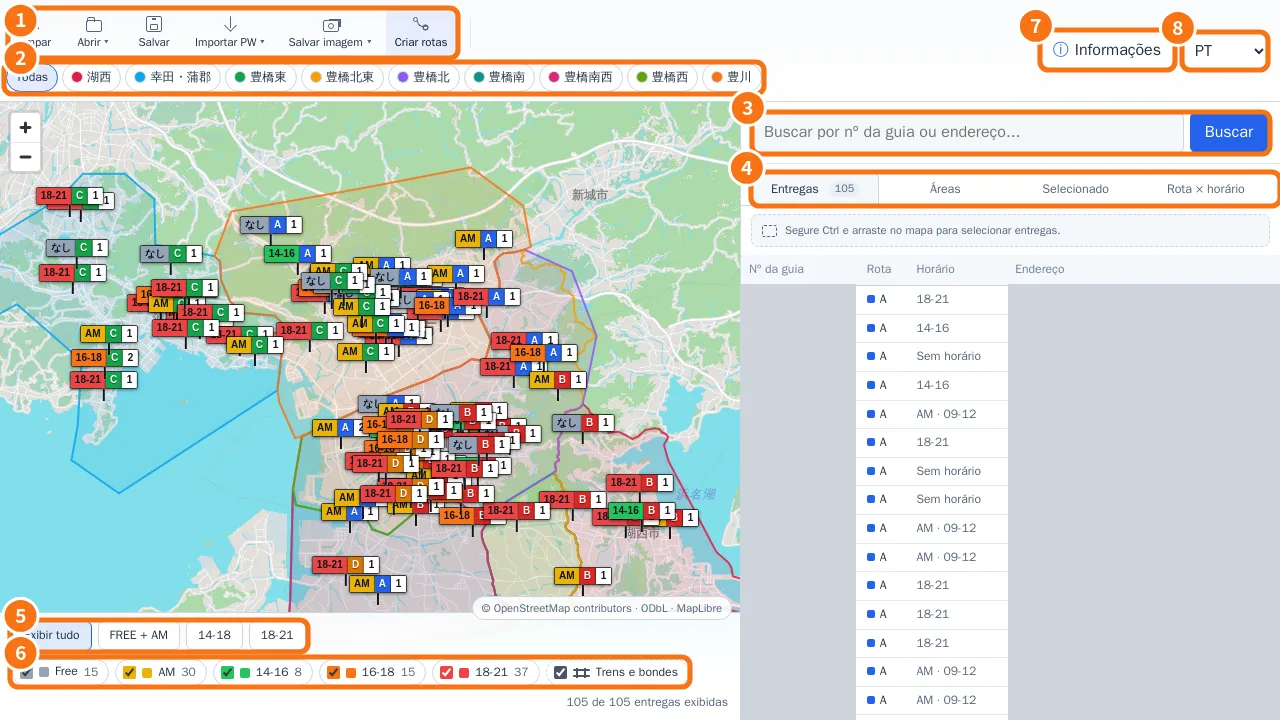
- Import the day's batch. On the map, Open → Select dados.bin, or Import PW → Paste from browser → paste → Analyze data → Add to map.
- Check the total. On the panel's Deliveries tab, compare the count with your list. The footer shows “X of Y deliveries shown”.
- Look for deliveries outside areas. Open Information → Areas and check Points outside any area. If there are any, adjust or create an area and click Reclassify points.
- Fix what is wrong. On the map, click the pin and change time, route or address. Save on the card.
- Split the work. If you have planning, click Build routes, tick the drivers, Generate preview, View paths on map and Apply distribution. Without it, set each delivery's route and use the Route × time window tab to balance.
- Check each route. Use the area buttons and time filters; Ctrl + click pins to see the sequence mileage.
- Produce material for drivers. Filter a route and use Save image → Save as PDF (A4), or on the Deliveries screen filter the route and click XLSX.
- Save. Click Save on the map. “Working file safely saved” appears. The original stays preserved.
- At the end of the day, record completions (if available) and run a Manual backup.
If something goes wrong
- Imported the wrong file? Import the right one: it becomes a new batch and the previous one stays in the history.
- Save failed? “Could not save. The previous file was kept.” appears. Nothing was lost; try again.
Related questions
- Import deliveries
- Intelligent route planning
- Ctrl selection and Save image
- Backup, restore and safe updates