











KoChiken · Pagsisimula
Sign in
Drivers: 8-digit code. Managers: e-mail, KOREOS or Google.
Sa pahinang ito
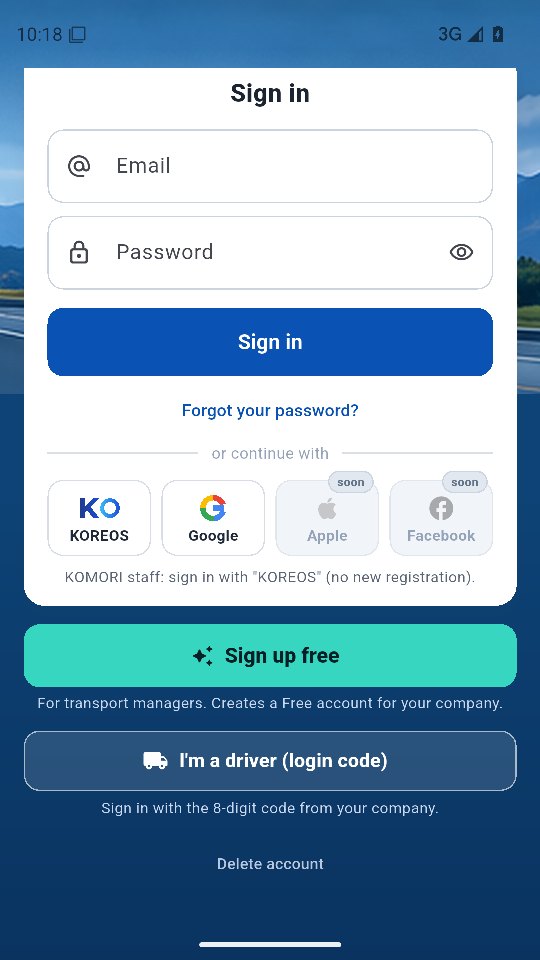
Sign-in screen
Open the KoChiken app (no app? use the web version).
Drivers
- Tap I'm a driver (login code) at the bottom of the screen.
- Enter the 8-digit login code from your company and tap Sign in.
- If the company sent a link or QR: on a computer or tablet, just open it to sign in to the web version (in the app, enter the 8-digit code).
No code or it does not work: ask the office for a new code.
Managers and KOMORI staff
- Enter your e-mail and password and tap Sign in. Forgot it? Tap Forgot your password?.
- KOREOS: KOMORI staff sign in with their KOREOS account (no new registration).
- Google: sign in with your Google account. Apple is coming soon.
- First time? Tap Sign up free: your company is created and you become its admin. Operations are registered on the web (kochiken.its-komori.com). It is free.
Delete your account
Use Delete account at the bottom of the sign-in screen, or the More menu after signing in.