











KoChiken · 界面与功能
Fuel stop: stop or skip
At a planned fuel stop, choose whether to stop; after refuelling, tap I refuelled.
此文章暂无您的语言版本,以English显示。
本页目录
Refuel guide
When the next destination is a planned fuel stop, the Refuel guide screen shows the station, address, distance from you and arrival time. Choose one of the two buttons:
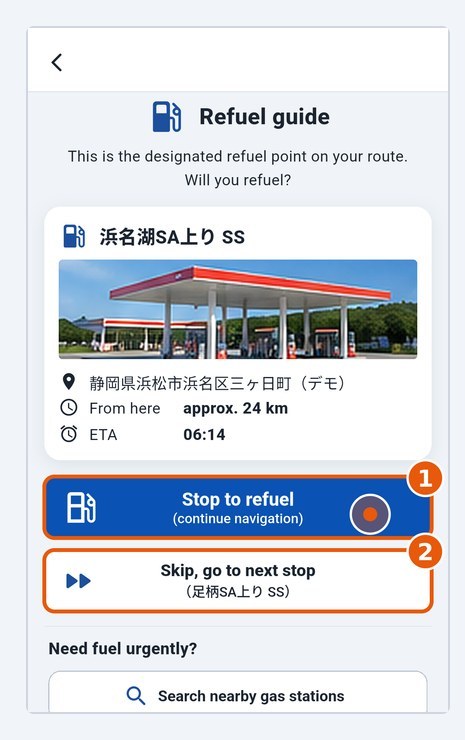
- Stop to refuel (1): the app navigates you to the station (the office is not notified yet).
- Skip, go to next stop (2): when you have enough fuel. Skipping refuel (sent) appears and the app moves on to the next destination.
After refuelling
- At the station, after refuelling, tap I refuelled at the bottom of the navigation (or on the Refuel guide screen). After tapping, the stop gets a ✓ in Today's schedule, confirming you have refuelled.
- When asked "Did you refuel at …? We will notify the office.", tap I refuelled.
- Refuel reported appears: the office and the group (CHAT) are notified automatically.
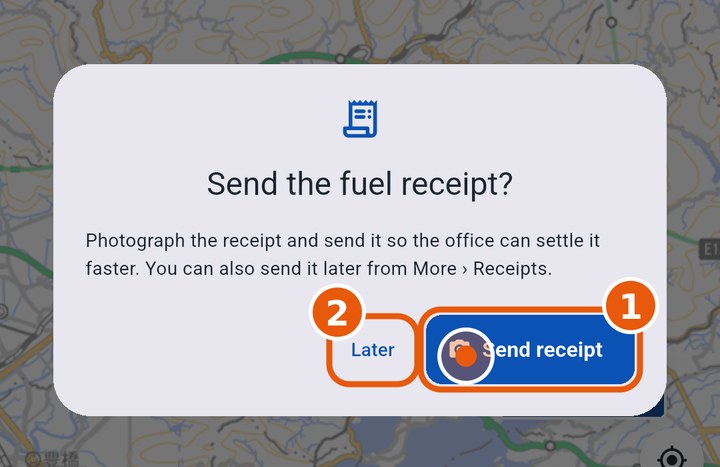
- Right after, the app asks Send the fuel receipt? Tap Send receipt (1) to photograph and send the receipt for this refuelling now, or Later (2) to send it afterwards from More › Receipts. Navigation then moves on to the next destination.
There is no separate "Arrived" button at a fuel stop. Fuel stops are a guide: if you need fuel urgently, use Search nearby gas stations.