











Kenten · 界面与功能
Answer an inspection
Choose a result for each question, explain what is wrong and, on shared forms, finish with a signature.
此文章暂无您的语言版本,以English显示。
本页目录
Answer
- Open the inspection or the shared daily form. Check the item and date at the top of the screen.
- For each question, choose the result: green = OK, yellow = Attention, red = Not OK. There is also Not applicable. Read the text and symbol, not just the color.
- Enter measurements when the question asks for them.
- Before finishing, review any unanswered questions.
Explain what is wrong
When you choose Attention or Not OK, two fields appear right under the question (up to 300 characters each):
- What is the problem? Describe what you saw.
- What was done or is still pending? Explain the action taken or what remains.
- Use the general observation for information about the whole inspection. Before saving, review the required correction, the person responsible and the deadline.
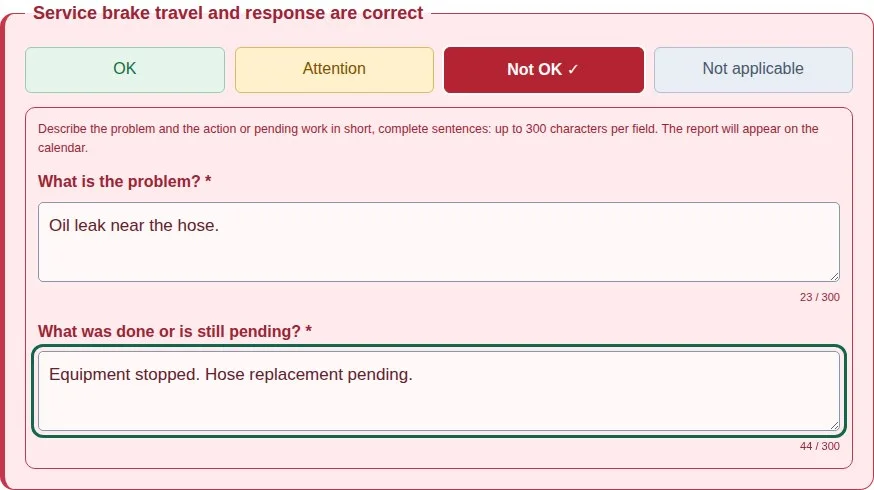
The per-question explanation and the general observation appear together on the monthly sheet. Don't repeat the same explanation in both places.
Shared form with a signature
The person doing the inspection doesn't need their own login. The responsible user shares an authorized link or QR code.
- Open the link or scan the QR code and follow any access steps shown.
- Answer the questions.
- Select your name from the team or type your own name, when the form allows it.
- Draw your signature on the screen with a finger or stylus. Clear and redraw if needed.
- Tick the confirmation, send it with your signature and wait for the saved confirmation.