










- Đã sửaKOCHAT on desktop now receives and answers voice calls. Invitations arriving before the audio offer also ring, and the app recovers invitations when a realtime notification is lost. Answering on one client stops ringing on the others.

Giao tiếp nhóm
KOCHAT
Trò chuyện, nhóm và tệp để làm việc cùng nhau.
Tính năng mới
- Đã sửaOn desktop, reply mode opens in a compact menu above the button, with four options and a checkmark on the current choice. Switching modes no longer shows duplicate notices. On phones, the picker still opens from the bottom.
- Cải tiếnPaste screenshots and files or drag them into the conversation. Check the preview, add a caption and send. The emoji panel includes search, recent items, favorites and licensed GIFs and stickers.
- Đã sửaChat lists and notifications show the first useful line, including messages with Markdown. Download photos, videos, audio and files with their original names. Wiki/Guide is available in Settings.
- MớiDelete messages, like on WhatsApp: touch and hold (or right-click) a message → Delete. "Delete for me" removes it only from your screen. "Delete for everyone" works on your own messages up to 60 minutes after sending: everyone sees "This message was deleted" and the attachment is deleted from the server. Use "Select" to delete several at once. Phone, computer and web.
- Cải tiếnWhen part of a screen doesn't load, the notice is now simple: "Couldn't load this right now" with a Try again button. The app also retries on its own a few times, and the technical detail is tucked away under "Details". The team is still notified automatically.
- Đã sửaCalendar: no longer breaks when opening a period with no events (the "Cannot modify an unmodifiable list" error on Windows and phones).
- MớiIn the app: Wiki / Guide: tabbed topics, search and filters on how to use KOCHAT, in your language. The "?" on each screen opens that screen’s help.
- MớiStatus tab on KOCHAT web too: «My status» at the top and who posted below (a colored ring split per story, grey = already seen). The «+» opens «Photos & videos» (several at once, caption, HD) or «Text» (color and font), full screen and fitting any window. The carousel left the top of Chats.
- Cải tiếnBackground sending: tap send and you can close — «My status» shows «Sending…» with your photo right away and says «Status update shared.» at the end. Privacy: My contacts (your company), My contacts except… or Only share with…; your choice is kept. Videos up to 30 s.
- Đã sửaFixed: your story stayed on «Preparing your story…» forever. The app now follows the server and swaps to the ready one by itself (showing your photo meanwhile). Lighter on 3G: photos are compressed on the device (Windows and Linux too), viewers see a blurred preview instantly and nothing downloads twice.
- MớiStories and status, like WhatsApp: people who posted appear at the top of Chats (blue ring = not seen yet). Post a photo, a video up to 15 s or a text on a colored background; everything disappears by itself in 24 h and only your company sees it. See who viewed yours, delete it earlier if you want, and replying to a story becomes a chat message. Photos and videos are made light before leaving the device. A quiet «someone posted a story» notice only from 8 am to 6 pm — turn it off in Settings › Notifications.
- Cải tiếnLocation in tabs (Status & policy · My history · Team, for those allowed). The history now comes by DAY and joins consecutive records at the same place («Toyohashi, Aichi · 07:12–16:18 · 16 records», tap to see each one), with the country flag, the city in your language and filters by period, device and app. It loads bit by bit as you scroll.
- MớiHundreds of new GIFs and stickers: the KOMORI mascot saying «了解!», «お疲れ様です», «Bora!», «kkkk», animated memes with Portuguese and Japanese captions, animated emoji and 3D stickers for work and the factory, food, animals, Japan and Brazil. All openly licensed (your photo menu → GIF & sticker credits).
- Cải tiếnIn the 😊 button of the message box: categories (Reactions, Thanks, OK, Sorry, Congrats, Food…), search in Portuguese, Japanese and English, «Recent» and «Favorites». Hover a GIF and click the ⭐ to keep it — it also works in the phone and desktop apps.
- Cải tiếnLanguage: choosing the language (Settings and the photo menu) is now a list with flags.
- Đã sửaSame status on every device: switch to Available, Busy, Away or Invisible on your phone and it changes instantly on the PC, on KOCHAT web and for your colleagues — and the other way round. «Busy» is now really saved. A device in the background no longer makes you «away» while another one is open.
- MớiVerified attachments: every file you receive gets a badge. Green «Verified» = checked and safe to open. Yellow «Can't verify» = asks before opening. Red «Possibly dangerous» (program, macro, PDF with script, virus) = opens only after ticking «I understand the risk». Tap the file to see why.
- Cải tiếnAnswered the call on your PC or in the browser? Your phone stops ringing right away.
- Đã sửaAuto-translate: a Portuguese message with a few Japanese terms (製造, 在留カード…) is no longer "translated from Japanese" into Portuguese. The language is now judged by most of the text; half-and-half messages are not translated automatically (tap "Translate" if you want) and the label shows the real source language.
- Đã sửaCalendar: "Open" on an event now shows its details right there instead of jumping back to chats. Side menu: the selected icon is centered.
- MớiAutomatic connection location in the browser, the KOREOS floating chat and the Windows app (company policy). The first time, a notice explains what is recorded and who can see it — tap Got it. The browser may ask for location permission. On phones it stays optional.
- MớiThe assistant's reply appears while it is being written — you start reading in a few seconds instead of waiting for the full answer.
- Đã sửaThe assistant no longer opens the wrong conversation (such as "Refinador") instead of yours.
- MớiWhat's new: after each update, this window shows what changed. To see it again: Settings › What's new.
- Cải tiếnEasier to read: no text smaller than 10 pt in labels and times. On computer and tablet, the A− / A+ buttons at the top of the chat change the text size (on phones: Settings › Text size).
- Đã sửaLong messages are no longer cut off. Above 4,000 characters they are sent as several messages in a row, in order, and a counter under the box tells you before sending. The supplier portal and translation work the same way.
Mới cập nhật
- Tasks, New task, Announcements and Team location (1.8.37)Slim top bar, New task with several assignees, web-like Announcements, Team · Location and returning to the same chat.English
- Files: preview, captions and sendingPreview videos, images, PDF and audio before sending, then follow progress.English
- Locked-phone calls, messages and presenceUpdate the app and check permissions, notifications and automatic presence.English
 Voice and video callsInside the conversation, the phone icon starts a voice call and the camera a video call. Answer/Decline show on screen.English
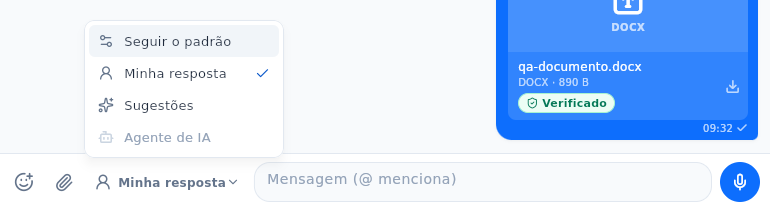 KOCHAT: paste, emoji, reply mode and attachment downloadsKOCHAT: paste, emoji, reply mode and attachment downloadsEnglish
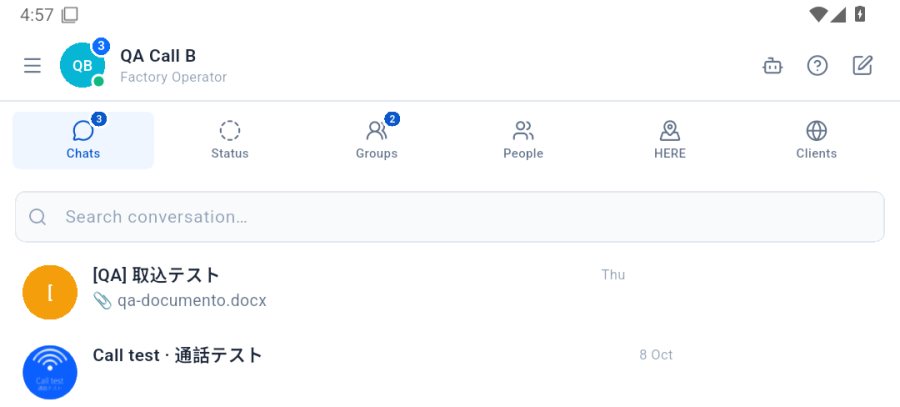 Getting started with KOCHATSign in with your company account and get to know the home screen: tabs, new chat and settings.English